Loading page…
Revit Family
One Way Light Switch Annotation Symbol
by Oksana Gritcai
About this asset
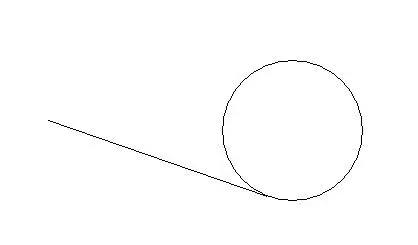
This one-way light switch annotation symbol is a Revit family component designed for clear electrical documentation in floor plans. The asset is a standard 2D drafting symbol representing a one-way light switch, typically used on electrical layout plans. It consists of a circular base with a single diagonal line extending outwards, conforming to common architectural drafting conventions. The geometry is clean, lightweight, and intended for use within plan views to denote the location and switching type of lighting controls. It does not contain 3D geometry; it is strictly an annotation family intended to scale correctly with the project view scale, ensuring consistency across all documentation sets and drawing sheets.
The download is a 297 KB file containing a Revit family (.rfa). Load it into a project from the Insert tab with Load Family, then place it like any other component of its category; it schedules and tags with the rest of your model.
Load this family into your project and access it via the Electrical Fixtures or Annotation Symbols categories. Once loaded, it can be placed directly onto floor plan views. Because it is an annotation-based family, it will maintain its relative size regardless of the view scale, keeping your electrical plans legible. Users can rotate the symbol to align with wall orientations or specific electrical schedules as required for the project documentation workflow.
This symbol is essential for electrical engineers and interior designers producing lighting and power plans for residential, commercial, or hospitality projects. It is typically paired with other electrical components such as socket outlets, dimmers, and two-way switches to provide a complete reflected ceiling or power layout. Professionals will find this useful during the construction documentation stage, where clear communication of electrical points is required for contractors on-site. It is a standard requirement for any Revit project involving lighting design and coordination.