Loading page…
Revit Family
Spot Elevation Detail Symbol with Draggable Lines
by GEORGE BOUERI
About this asset
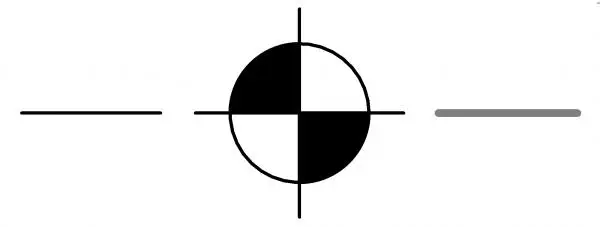
This Revit annotation family provides a professional spot elevation symbol with adjustable leader lines for precise documentation. This spot elevation symbol features a clean, high-contrast circular head divided into four quadrants, with alternating black and white fills for clear readability in technical drawings. The design includes horizontal and vertical crosshairs extending from the central point, providing precise alignment for floor levels and site topography. Integrated draggable lines allow for flexible placement and adjustment of the leader extensions, ensuring the symbol can be positioned optimally within crowded plan views or detailed sections without obscuring underlying geometry. The geometry is strictly two-dimensional, adhering to standard architectural drafting conventions for clear level identification.
The download is a 184 KB file containing a Revit family (.rfa). Load it into a project from the Insert tab with Load Family, then place it like any other component of its category; it schedules and tags with the rest of your model.
To implement this in a project, load the RFA file into your Revit environment and access it via the Annotate tab under the Spot Elevation tool or as a standalone generic annotation symbol. Once placed, use the instance parameters to adjust the length of the leader lines to suit specific drawing scales and layout requirements. The family is designed to maintain consistent line weights across various view scales, ensuring clarity when printing at A1, A3, or standard construction document sizes.