Loading page…
Revit Family
Glazed Metal Curtain Wall Panel
by Octavian Geliman
About this asset
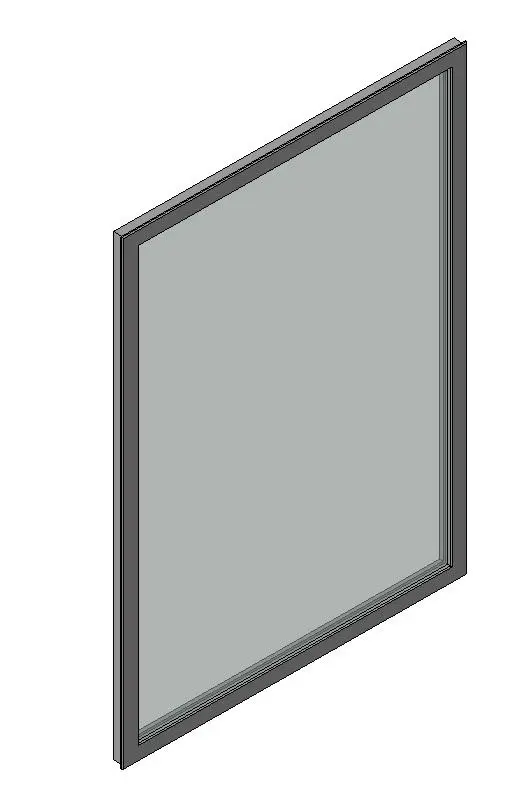
This glazed metal curtain wall panel is a Revit family component designed for integration into modular facade systems. This curtain wall panel features a minimalist, slim-profile metal frame housing a single large pane of glazing. The design is clean and utilitarian, focusing on standard architectural proportions suitable for contemporary building skins. The frame depth is consistent, allowing for seamless alignment within standard mullion grids. The glazing is represented with neutral, semi-transparent material settings, providing a realistic look in both shaded and rendered views. This component is engineered as a standard system panel, ensuring it maintains structural clarity while contributing to a high-performance, modern exterior aesthetic for commercial or residential facade assemblies.
The download is a 287 KB file containing a Revit family (.rfa). Load it into a project from the Insert tab with Load Family, then place it like any other component of its category; it schedules and tags with the rest of your model.
To implement this component, load the RFA file into your project and swap existing curtain wall panels via the Type Selector. Use the Tab key to select individual panels within a curtain wall assembly to replace them. Adjust the instance parameters to align with your specific grid dimensions. For scheduling, ensure the shared parameters are mapped correctly to your project's data requirements to maintain accurate material take-offs and facade documentation throughout the design process.