Loading page…
Revit Family
Tree – Variant 17
by Tianyue Xiao
About this asset
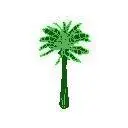
This Palm Tree planting Revit family is a standard site component designed for exterior architectural visualisation and documentation. This Revit family consists of a symbolic representation of a palm tree, featuring a vertical trunk and a symmetrical canopy of fronds. The geometry is lightweight, intended for clear representation in site plans, landscape layouts, and massing studies where heavy foliage meshes are not required. The design uses standard Revit planting categories, allowing for visibility control through object styles and view templates. It serves as a functional placeholder that maintains clean graphical output in 2D documentation while providing a recognisable silhouette for 3D massing and site context models in architectural project files.
The download is a 82 KB file containing a Revit family (.rfa). Load it into a project from the Insert tab with Load Family, then place it like any other component of its category; it schedules and tags with the rest of your model.
Load this family into your project via the component tool to populate site plans or exterior scenes. Because it is a native Revit planting family, you can manage its visibility using the Visibility/Graphics overrides, allowing you to toggle the tree on or off across different scales or plan types. The lightweight file size ensures minimal impact on model performance, making it suitable for large-scale site masterplanning or extensive landscape documentation where many instances are required.
This asset is ideal for residential gardens, hospitality resort developments, and urban landscape projects requiring clear site context. Professionals often use such symbolic trees to define exterior spaces, create visual interest in site plans, or provide scale to building elevations. It is particularly useful during early design stages and schematic development phases when rapid massing and site layout are priorities. Search for this component when drafting landscape masterplans, outdoor courtyard designs, or when adding greenery to exterior 3D perspectives in Revit.