Loading page…
Revit Family
Masonry Vault Structural System
by Jeffrey Allsbrook
About this asset
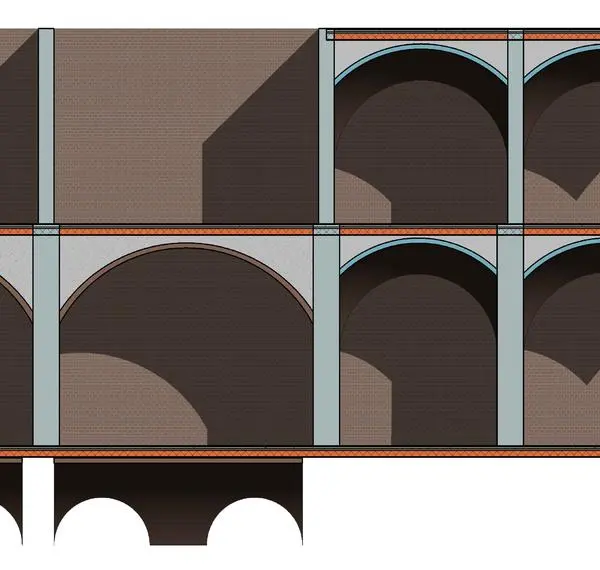
This Masonry Vault structural system for Revit provides a robust method for modelling traditional arched ceiling assemblies. The Masonry Vault system features a series of repeating arched bays supported by vertical masonry piers. The design emphasizes traditional construction techniques, showcasing exposed brickwork within the vaulting and stone-toned structural columns. Proportions are calibrated for large-scale interior volumes, typical of historic or industrial architectures. The assembly includes defined layering for the vault itself, separating the structural arch from the finish materials. This allows for precise representation in section cuts and elevation views, clearly distinguishing the arch geometry from the surrounding floor or ceiling plates above.
The download is a 225 KB file containing a Revit family (.rfa). Load it into a project from the Insert tab with Load Family, then place it like any other component of its category; it schedules and tags with the rest of your model.
In Revit, this family is typically loaded as a structural component and placed within the model to define ceiling voids or structural bays. Users should align the vault axes with the primary grid lines to ensure consistent spacing across the floor plate. Materials can be adjusted via the family parameters to match project-specific brick or stone finishes. It is recommended to use this in conjunction with section boxes to manage complex model visibility and ensure accurate documentation of the structural assembly.