Loading page…
Revit Family
Section Marker Annotation Symbol
by Josh Treiber, RA
About this asset
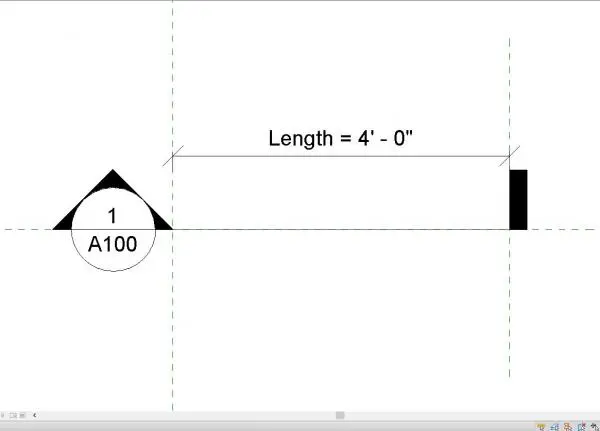
This Revit annotation symbol provides a standard section marker head and tail for precise construction documentation and drafting. This annotation family consists of a standard circular section head paired with a tail marker, designed to indicate the cut plane and direction of a building section. The circular head includes fields for the section number and sheet reference, while the line-based tail allows for adjustable length to match specific drawing requirements. The geometry is clean, utilising standard line weights typical for architectural detailing. It is a strictly 2D element intended for use within Revit plan views to ensure clear, consistent communication of section locations across all project documentation sets.
The download is a 338 KB file containing a Revit family (.rfa). Load it into a project from the Insert tab with Load Family, then place it like any other component of its category; it schedules and tags with the rest of your model.
Load this family into your Revit project as a generic annotation or section head component. Once placed in a plan view, use the instance parameters to adjust the length of the section tail to span the desired area. Ensure the text labels for sheet and detail numbers are mapped correctly to your project parameters to allow for automatic referencing. This family is designed to be lightweight and should not impact project performance during sheet production.
Professionals use this marker to define section cuts in floor plans, roof plans, and site plans across residential, commercial, and hospitality projects. It is an essential component for any drawing set, enabling architects and technicians to clearly reference vertical sections back to the main model. Whether documenting complex interior layouts or structural building envelopes, this symbol ensures that section references remain consistent and legible. It pairs effectively with standard Revit title blocks and view templates during the construction documentation phase of a project.