Loading page…
Revit Family
Section Head - 1 Point Filled - ARchitxt
by Nghi (Pepper) Nguyen
About this asset
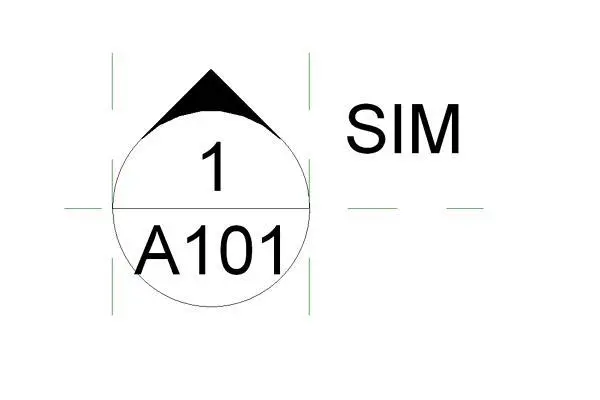
This Revit family provides a clean, professional section head symbol for technical drawing documentation and construction sets. Designed for clarity in construction documentation, this section head features a circular frame divided by a horizontal line, separating the detail number from the sheet reference. A filled triangle at the top indicates the direction of the view, ensuring consistent graphical standards across architectural drawing sets. The family is built with standard Revit text parameters, allowing for seamless integration into existing project templates. Its geometry is precise and lightweight, maintaining clean line weights when plotted at various scales. This symbol provides a structured way to reference building sections, elevations, or callouts within a comprehensive project package.
The download is a 61 KB file containing a Revit family (.rfa). Load it into a project from the Insert tab with Load Family, then place it like any other component of its category; it schedules and tags with the rest of your model.
To implement this symbol, load the family into your Revit project and assign it within the Section Tag type properties. Once loaded, it becomes available for use in the View tab under Section settings. The parameters are mapped to standard Revit project information, ensuring that sheet numbers and detail references update automatically when placed on sheets. This family maintains consistent scaling across multiple viewports, regardless of the scale assigned to the specific drawing.