Loading page…
Revit Family
Elevation Head Turkish Standard
by Bill Caplan
About this asset
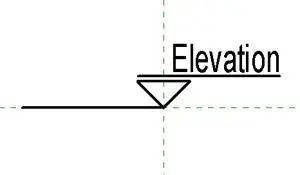
This Revit elevation head symbol follows Turkish standard drafting conventions for architectural documentation and plan referencing. The elevation head is a clean, minimalist graphic component designed for clear communication on construction documentation. It features a triangular marker base connected to a horizontal line, with text labels positioned above the datum line for easy readability. The geometry is strictly two-dimensional, using standard line weights to maintain legibility at various output scales. This symbol is designed to integrate seamlessly into existing project templates, ensuring that elevation tags remain consistent across all sheets. It provides a professional, standardised appearance suitable for formal tender packages and detailed construction drawings.
The download is a 164 KB file containing a Revit family (.rfa). Load it into a project from the Insert tab with Load Family, then place it like any other component of its category; it schedules and tags with the rest of your model.
To implement this family, load the RFA file into your current project and assign it within the elevation tag type properties via the Project Browser. Once active, the symbol will automatically populate with the relevant view name and sheet reference data from the project parameters. Users can adjust the label visibility or text size by editing the nested annotation family. It is best practice to keep these symbols on a dedicated annotation layer to maintain control over view-specific graphic overrides.