Loading page…
Revit Family
Custom Line Type with Diameter Symbol
by Shixa Patel
About this asset
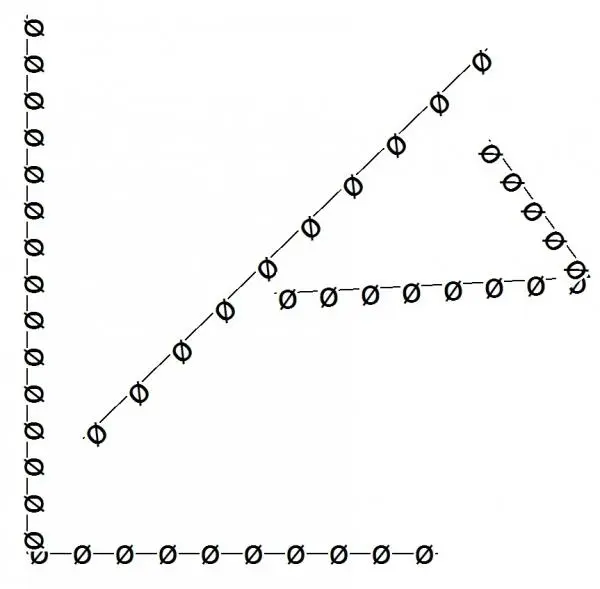
This custom line type for Revit features a recurring diameter symbol along the path, suitable for technical drafting documentation. The line type consists of a standard continuous line segment punctuated by a repeating diameter symbol at consistent intervals. Designed specifically for Revit drafting environments, this pattern allows for clear graphic representation on technical drawings where specific diameter markers are required for site plans, mechanical schematics, or structural detailing. The geometry is clean and vector-based, ensuring that it scales appropriately across various view scales without losing definition or clarity. It is a lightweight, efficient drafting asset that integrates directly into project templates or line style libraries to streamline documentation workflows.
The download is a 236 KB file containing a Revit family (.rfa). Load it into a project from the Insert tab with Load Family, then place it like any other component of its category; it schedules and tags with the rest of your model.
To implement this line type, load the definition into your Revit project via the Transfer Project Standards tool or by importing the line pattern file into the Line Patterns dialogue box. Once loaded, create a new Line Style under the Manage tab and assign this custom pattern to it. Users can then apply the style directly to detail lines, model lines, or within system families to denote specific pipe runs, conduit paths, or structural elements in plans and sections.
This custom line type is best suited for MEP engineering, industrial facility design, and complex structural drafting where specific line coding is necessary for project clarity. It is particularly useful for identifying diameter-specific services on site plans or for creating custom legend entries in construction documents. Professionals working on large-scale infrastructure or mechanical plant projects will find this asset helpful for maintaining consistent graphic standards across multi-disciplinary drawing sets, ensuring that all diameter-related systems are visually distinct from standard building geometry.