Loading page…
Revit Family
Break Line Annotation Symbol, Linear
by YUZHU CAI
About this asset
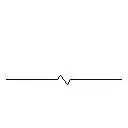
This Break Line annotation symbol is a Revit family designed for technical documentation, featuring a clean linear graphic style. The Break Line annotation symbol is a clean, minimalist 2D drafting component designed for use in Revit project documentation. It features a standard zig-zag break graphic integrated into a straight line, providing a clear visual indicator for truncated elements or partial views on floor plans, sections, and detail sheets. The geometry is lightweight, ensuring minimal impact on project file size while maintaining high readability at various scales. As a standard annotation family, it provides consistent line weights and clear linework, adhering to common architectural drafting conventions for clarity in construction documentation sets.
The download is a 51 KB file containing a Revit family (.rfa). Load it into a project from the Insert tab with Load Family, then place it like any other component of its category; it schedules and tags with the rest of your model.
Users can load this RFA file directly into their Revit project or template as a detail item or generic annotation. Once inserted, the symbol can be rotated, mirrored, or stretched to align with specific drafting requirements on sheets. It is best managed within the project browser under detail items, allowing for quick placement during the documentation phase. Users should ensure the line weight is adjusted within the object styles to match the office standard for project-specific annotations and line types.