Loading page…
Revit Family
Break Line Annotation Symbol, Detail Component
by D. Marie Olsen
About this asset
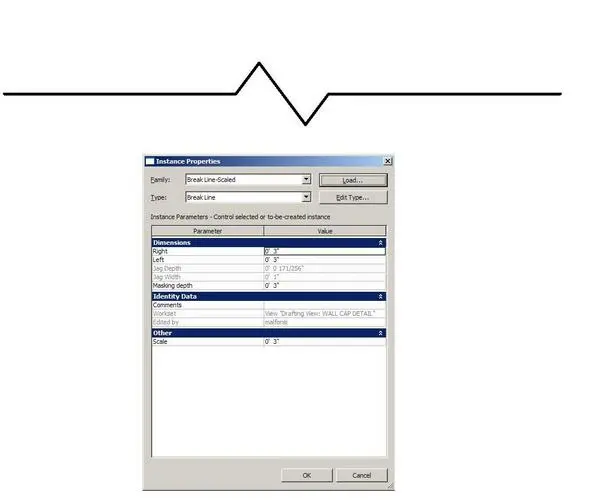
This Revit annotation symbol is a parametric break line family designed to assist in creating clean, professional 2D construction details. This break line symbol serves as a crucial drafting component for standard 2D construction documentation in Revit. It features a clean, single-line graphic representation with a central triangular jag, mimicking traditional hand-drafting conventions for truncated sections. The family includes instance parameters for adjusting the length of the right and left segments, as well as specific controls for the depth and width of the central jag. This allows for precise alignment across various drawing scales, ensuring that the visual weight of the break line remains consistent with project-wide annotation standards, regardless of the detail view scale.
The download is a 174 KB file containing a Revit family (.rfa). Load it into a project from the Insert tab with Load Family, then place it like any other component of its category; it schedules and tags with the rest of your model.
To use this family, load the rfa file into your Revit project and access it via the Detail Component tool in your drafting views. Once placed, use the instance parameters in the properties palette to stretch or compress the line length to fit your specific detail geometry. Adjust the jag depth and width to maintain aesthetic consistency across your sheet set. This symbol is non-model based and is intended for use exclusively within 2D drafting views or drafting view templates.
Ideal for architectural and structural detailing, this symbol is essential for any project requiring truncated section cuts, such as wall sections, joinery details, or MEP conduit runs. It is commonly paired with standard line-based detail components to clearly indicate where a long element has been shortened for clarity on a drawing sheet. By incorporating this into your template, you ensure uniform drafting quality across all phases of documentation, from schematic design through to construction administration, maintaining a professional look for all technical annotations.