Loading page…
CAD Drawing
Excavator Working Radius CAD Drawing
by Siqi Xu
About this asset
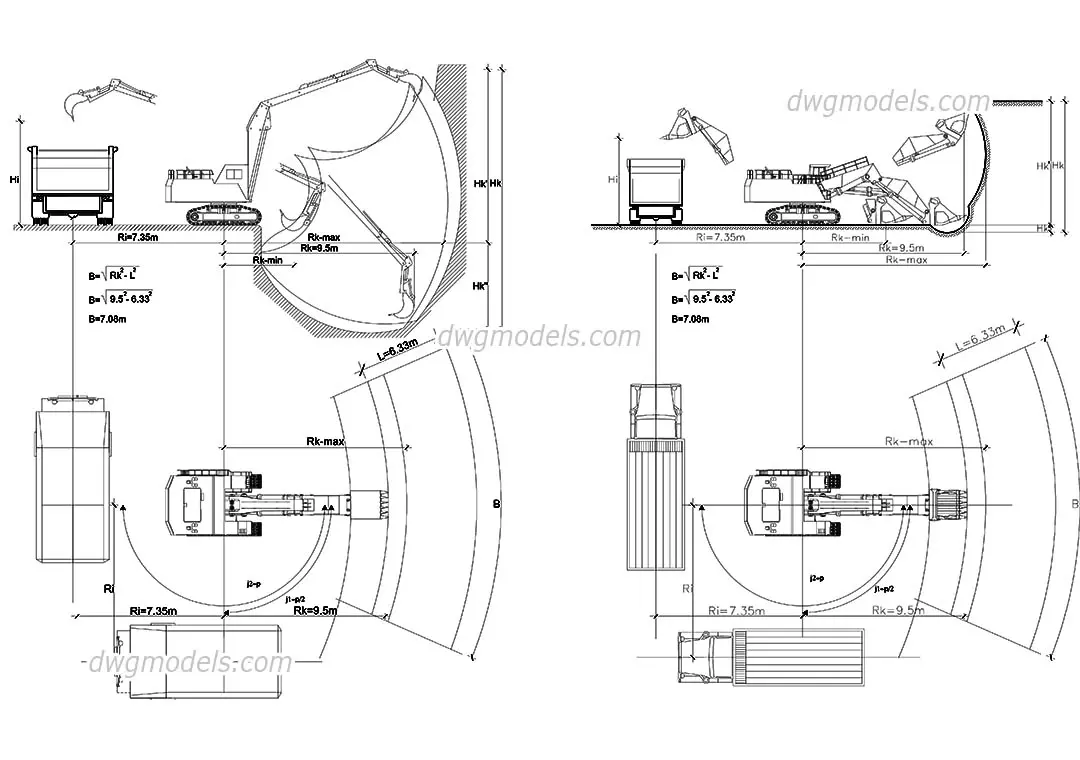
This AutoCAD DWG drawing provides essential technical site data for an excavator, detailing its operational working radius. This technical CAD drawing illustrates the operational range of a tracked excavator in both plan and elevation views. It provides critical spatial data, including maximum and minimum digging radii, reach envelopes, and clearance heights when positioned alongside a haulage truck. The linework is clean and precise, clearly mapping out the turning circles and the geometric reach of the hydraulic arm during standard site excavation tasks. Calculated dimensions and mathematical formulas for the working area are included, making this a functional reference for site logistics, heavy equipment placement, and clearance planning within complex construction environments.
The download is a 430 KB file containing an AutoCAD drawing (.dwg) drawn in plan and elevation. It opens in AutoCAD, BricsCAD, DraftSight and other DWG-compatible CAD programs, ready to insert as blocks into plans and elevations.
Professional users should insert this DWG file directly into site plans or construction staging layouts within AutoCAD. The geometry is vector-based and easily scalable, allowing architects and site engineers to overlay the excavator's radius onto existing site topography or foundation footprints. Users can adjust the scale to match specific equipment sizes or project requirements, ensuring that site access paths and loading zones are accurately accounted for during the planning stages of heavy civil or industrial projects.