Loading page…
CAD Drawing
Traditional Panel and Glazed Door Set
by Mehran Ayati
About this asset
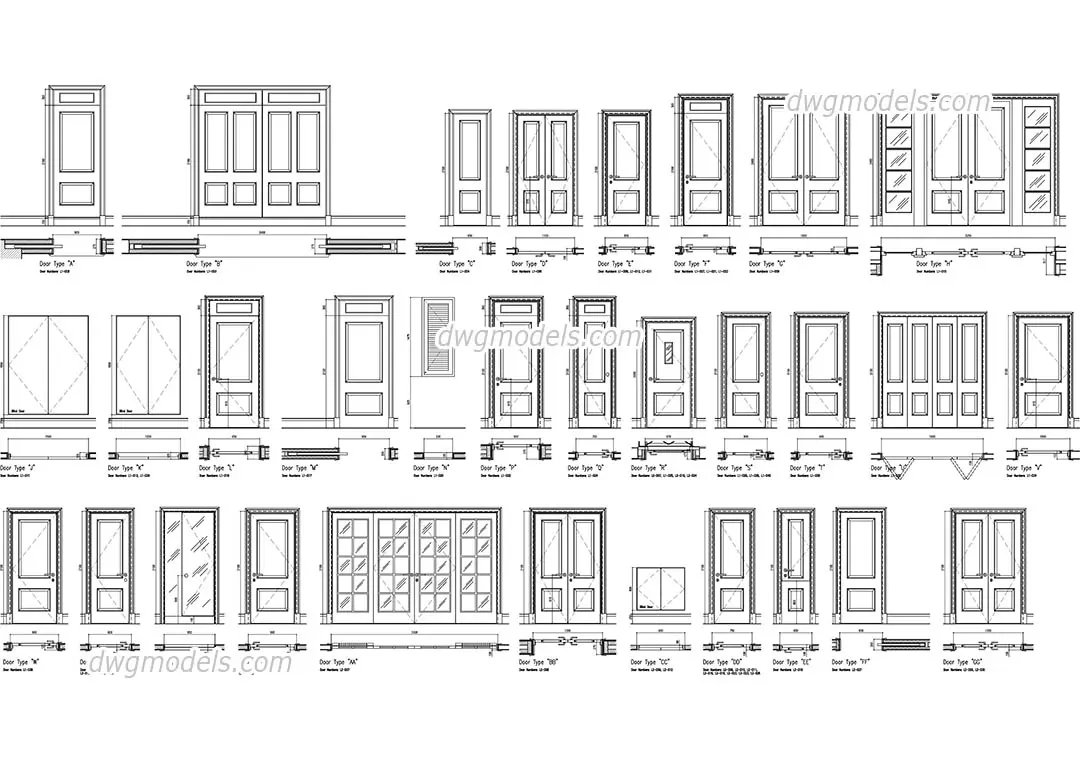
A comprehensive set of traditional door CAD blocks in AutoCAD DWG format, featuring various panelled and glazed configurations. This extensive library includes thirty distinct door types, encompassing single-leaf, double-leaf, and sliding configurations. Each entry is provided as a professional 2D CAD block, featuring a front elevation and a corresponding plan view. The designs range from classic solid-panelled doors to glazed variants with varied muntin patterns, including multi-light and sidelight options. Proportionally accurate and clean in linework, these blocks are clearly labelled for easy identification within a project schedule. The collection provides the essential variety needed for residential or commercial floor plans, ensuring consistent representation across all construction documentation phases.
The download is a 369 KB file containing an AutoCAD drawing (.dwg) drawn in plan and elevation holding 30 separate objects. It opens in AutoCAD, BricsCAD, DraftSight and other DWG-compatible CAD programs, ready to insert as blocks into plans and elevations.
Architects and drafters can efficiently manage these blocks by inserting them directly into AutoCAD drawings or by using the DesignCenter to drag and drop specific types into active files. Because these are standard 2D vector entities, they are easily scalable and can be placed on specific layers to control line weights and visibility. They serve as an ideal foundation for creating door schedules, allowing professionals to quickly populate floor plans and elevations with consistent, standardised architectural symbols.