Loading page…
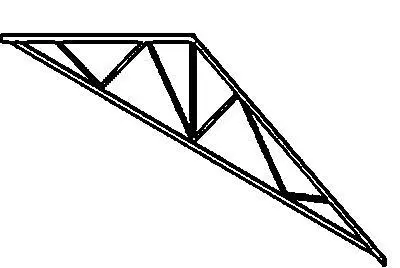
Revit Family
Modified Queen Post Steel Truss
by Tjeerd Haccou
About this asset
This Revit family provides a modified queen post steel truss, designed for efficient roof framing and structural support in Revit. The modified queen post truss features a geometric configuration consisting of a top chord, a bottom chord, and a series of vertical and diagonal web members. The design incorporates a central post with additional bracing members to distribute loads effectively across the span. The profile is engineered for standard roof applications, providing a clean, linear aesthetic suitable for exposed structural systems. The geometry is defined by precise connectivity points, ensuring accurate integration with other structural members within the BIM environment. This component is constructed for clear, schematic representation in elevation and section views.
The download is a 102 KB file containing a Revit family (.rfa). Load it into a project from the Insert tab with Load Family, then place it like any other component of its category; it schedules and tags with the rest of your model.
In Revit, load this family into your project and place it within the structural framing category. Use the alignment and snap tools to connect the truss to your supporting columns or wall plates. The family allows for adjustment of the span and pitch to match specific project requirements. Ensure the material parameters are set to reflect your specified structural steel finish, and utilise the visibility settings to control the level of detail across different views, such as coarse, medium, or fine.