Loading page…
Revit Family
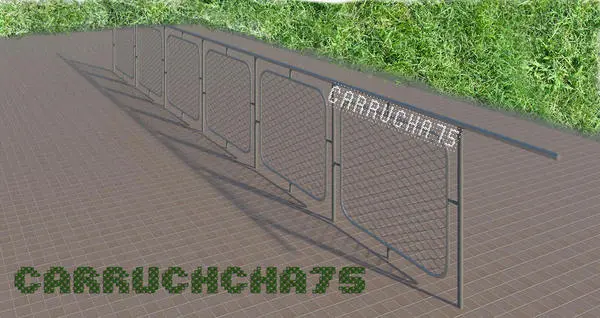
Industrial Grey Metal Chain Link Baluster Panel
by Allan Felix
About this asset
This industrial metal chain link baluster panel is a native Revit family component designed for custom railing and fencing systems. This baluster panel features a robust, industrial aesthetic, constructed from a grey-finished metal frame that encapsulates a fine chain link mesh grid. The design consists of a rectangular steel perimeter frame with integrated vertical supports, providing a rigid structure for security or boundary demarcation. The mesh is evenly tensioned within the frame, offering a semi-transparent visual profile that maintains structural integrity while remaining lightweight. Its clean lines and utilitarian finish make it suitable for projects requiring a functional, no-nonsense architectural element that balances visibility with physical containment.
The download is a 246 KB file containing a Revit family (.rfa). Load it into a project from the Insert tab with Load Family, then place it like any other component of its category; it schedules and tags with the rest of your model.
As a native Revit family, this baluster component is intended for insertion into a custom railing host family. Users should load the file into the project, then access the Railing Type Properties to assign this specific family as the primary baluster element. Adjust the spacing and offset parameters within the railing assembly to ensure the mesh panels align correctly along the path. Material parameters can be modified through the object’s type properties to adjust the metal finish or colour as required.