Loading page…
Revit Family
White Plastic Patient Transfer Slide Board with Wall Hooks
by Shuqing Qiao
About this asset
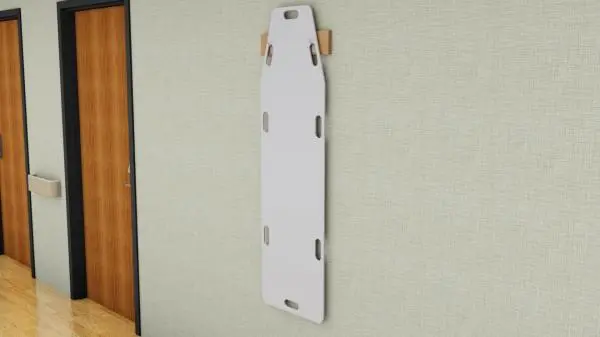
This medical transfer slide board Revit family features an elongated contoured body hanging securely from a wall-mounted support cleat. The model features a full-length patient lateral transfer board constructed with rounded perimeter edges and multiple cut-out handgrips along both long edges and both ends. A tapered head section narrows gently for ergonomic handling. Behind the top handles, the board hangs vertically on a dedicated wall bracket with timber-toned support blocks. Geometry displays clean planar faces suitable for rapid medical equipment layout, with a durable white low-friction surface finish on the board slab and neutral timber texture on the mounting cleat.
The download is a 369 KB file containing a Revit family (.rfa). Load it into a project from the Insert tab with Load Family, then place it like any other component of its category; it schedules and tags with the rest of your model.
Load this component directly into your project as a Specialty Equipment element. Position it vertically against corridor or room partition assemblies in plan view, adjusting mounting elevation to maintain code-required clearance above finished floor level. Geometry displays correctly across standard coarse, medium, and fine detail view templates.
Essential for clinical planning, this fixture fits inside hospital circulation corridors, inpatient bed bays, trauma rooms, emergency departments, and imaging suites. Healthcare planners often specify it alongside crash carts, patient gurneys, wall crash rails, and sanitiser dispensers during schematic equipment allocation through to detailed stage delivery.