Loading page…
Revit Family
Wheelchair Turnaround Circle Symbol
by Su Aksoy
About this asset
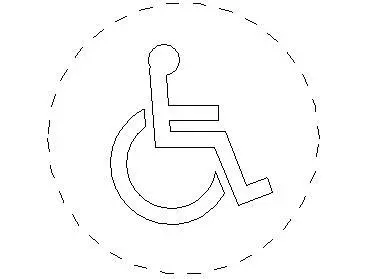
This wheelchair turnaround circle is a Revit family annotation symbol used to indicate accessible clearance zones in floor plans. The asset provides a standard 2D representation of the international wheelchair accessibility symbol, enclosed within a dashed circular boundary representing the required turnaround radius. It is a lightweight, line-based family designed for clear visibility in documentation. The geometry is strictly plan-based, featuring the iconic seated figure and wheel graphic, ensuring compliance with standard architectural drawing conventions. This symbol is essential for verifying space requirements in bathrooms, corridors, and primary circulation areas, offering a clean, precise visual aid for project documentation without adding unnecessary file weight or complex 3D geometry to the model.
The download is a 51 KB file containing a Revit family (.rfa). Load it into a project from the Insert tab with Load Family, then place it like any other component of its category; it schedules and tags with the rest of your model.
Load this family into your project and place it directly into floor plan views where accessibility compliance is required. Because it is an annotation-based family, it will maintain its scale relative to the view, ensuring readability regardless of the drawing sheet scale. You can easily align the centre point of the circle with fixtures or room corners to verify that the required clear floor space for a wheelchair rotation is achieved within your design layout.