Loading page…
Revit Family
Stacked Rock Retaining Wall System
by David Marco Ciscar
About this asset
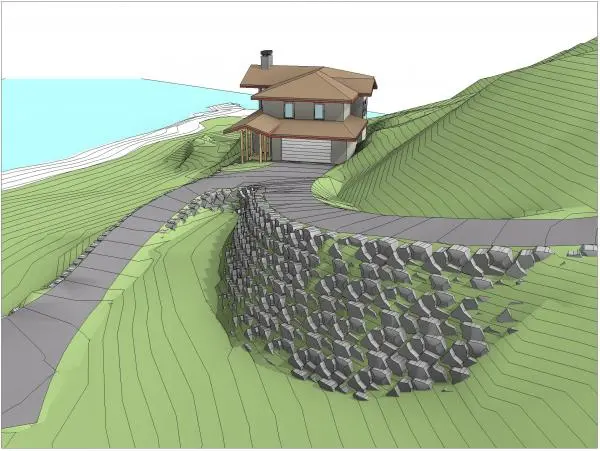
This Revit family provides a stacked rock retaining wall system for site modelling, featuring irregular stone blocks for terrain. This retaining wall component consists of individual, irregular stone blocks arranged to simulate a natural stacked rock structure. The geometry focuses on creating a rugged, organic appearance suitable for steep terrain and slope stabilisation in landscape design. The blocks are modelled with varied shapes and sizes to prevent repetitive patterns, providing a realistic texture that integrates well with topographical contours. It is designed to be placed along site boundaries or driveways to manage elevation changes, offering a sturdy, rustic aesthetic that complements natural surroundings and outdoor environments in architectural site plans.
The download is a 645 KB file containing a Revit family (.rfa). Load it into a project from the Insert tab with Load Family, then place it like any other component of its category; it schedules and tags with the rest of your model.
In Revit, this family is intended for placement within site plans and 3D views to define grade changes. Users can insert the component along defined topo surfaces or path boundaries. The family is typically controlled by adjusting the placement points to follow the terrain profile. For documentation, ensure the visibility settings are configured correctly within the site plan view templates to maintain a clean graphical representation while providing necessary depth and detail in section cuts and elevation drawings.