Loading page…
Revit Family
Line with Symbol
by Keenan Shepard
About this asset
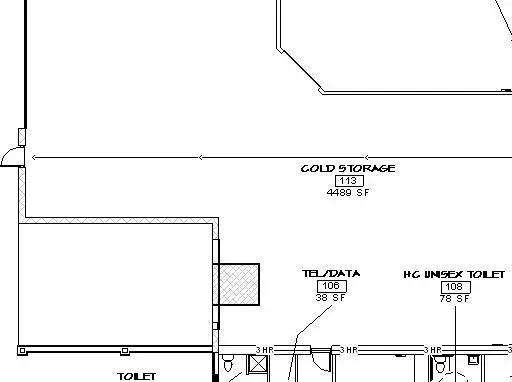
This Revit detail component is a custom line-based family designed for plan-based annotations and drawing documentation. The component consists of a linear drafting element integrated with a standard annotation symbol, intended for use within Revit floor plan views. It functions as a parametric line-based family, allowing users to draw and snap the element along specific paths or boundaries in a project. The visual representation is purely two-dimensional, consisting of clean black lines and clear symbology suitable for technical documentation and construction sets. It is designed to maintain consistent line weights and scaling across different project views, ensuring clarity and readability in final printed sheets.
The download is a 195 KB file containing a Revit family (.rfa). Load it into a project from the Insert tab with Load Family, then place it like any other component of its category; it schedules and tags with the rest of your model.
Load this family into your Revit project and access it via the Detail Component tool within the Annotate tab. Once loaded, you can sketch the line-based component in plan views, adjusting its length dynamically by snapping to existing model elements or reference planes. It is best practice to assign this component to a dedicated annotation sub-category to maintain control over visibility and line weight overrides across various view templates.
This annotation tool is essential for professional architectural and engineering documentation, particularly in commercial, industrial, or residential projects where specific zones or paths require clear graphical delineation. It is frequently employed for marking service runs, fire-rated boundaries, or circulation paths on floor plans. Architects and technicians will find this useful for streamlining the creation of construction documents, ensuring that site plans and floor layouts remain consistent with office standards and project-specific documentation requirements.