Loading page…
Revit Family
Double Break Line Detail Component, Linear
by rafael silva
About this asset
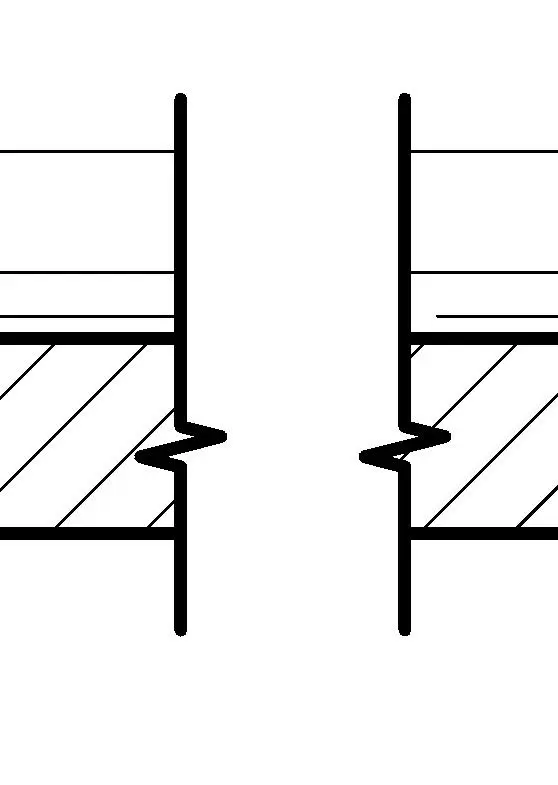
This Double Break Line Revit detail component provides a professional drafting symbol for truncating long elements in technical drawings. The Double Break Line is a standard 2D annotation family designed for use within Revit drafting views and detail sections. It features a clean, vector-based line style that mimics traditional architectural break lines, allowing for the visual truncation of elongated structural or finish elements. The geometry is purposefully simple, ensuring it does not clutter technical sheets while maintaining clear communication of intent. It is designed to be placed over existing linework to indicate that a portion of the object has been omitted for space efficiency within the documentation set.
The download is a 236 KB file containing a Revit family (.rfa). Load it into a project from the Insert tab with Load Family, then place it like any other component of its category; it schedules and tags with the rest of your model.
Load this detail component into your project file via the component library. Once loaded, it can be placed directly onto drafting views, legends, or detail sheets. Use the align and snap tools to position the break line precisely across the geometry you wish to truncate. Because this is a native Revit family, you can adjust the line weight and pattern through the object style settings to match your office CAD standards and line weight hierarchy.
This component is essential for architects, structural engineers, and interior designers working on detailed construction documentation. It belongs in any project where long members, such as beams, columns, or continuous wall sections, must be shortened to fit within a specific sheet layout. Professionals typically use this symbol during the design development and construction documentation phases to keep drawings legible and concise. It pairs perfectly with standard section markers, callouts, and dimension strings to maintain a professional, clean, and industry-standard set of technical drawings.