Loading page…
Revit Family
Truss Tag Annotation Symbol
by Qiang Guo
About this asset
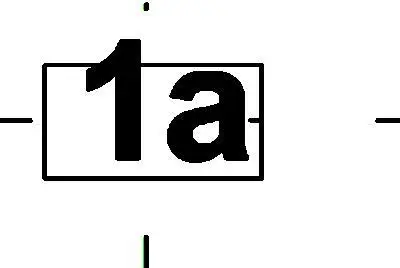
This Revit annotation symbol is a structural tag designed for labelling trusses within construction documentation and model views. The tag features a clean, professional rectangular frame enclosing alphanumeric text. Designed for clarity in technical drawings, the geometry maintains constant scale relative to the paper space, ensuring legibility across various plot scales. The family is built using standard line-based annotation components, providing a crisp, high-contrast appearance typical of industry-standard structural detailing. It is intended for use with truss categories in Revit, allowing for automated data extraction from model parameters. The design is straightforward and utilitarian, prioritising efficient communication of structural element IDs within complex roof or floor framing plans.
The download is a 51 KB file containing a Revit family (.rfa). Load it into a project from the Insert tab with Load Family, then place it like any other component of its category; it schedules and tags with the rest of your model.
To implement this family, load the RFA file into your project template or active structural model. Once loaded, access the tag via the 'Tag by Category' tool or by selecting the specific truss element and applying the tag type. Users can map the label to shared parameters for automated scheduling, allowing for seamless integration with structural schedules. The symbol remains view-dependent, automatically adjusting its orientation based on the host element's placement in the model.