Loading page…
Revit Family
Wall-Mounted Room Scheduling Display – Steelcase RoomWizard
by Carmelia Chiang
About this asset
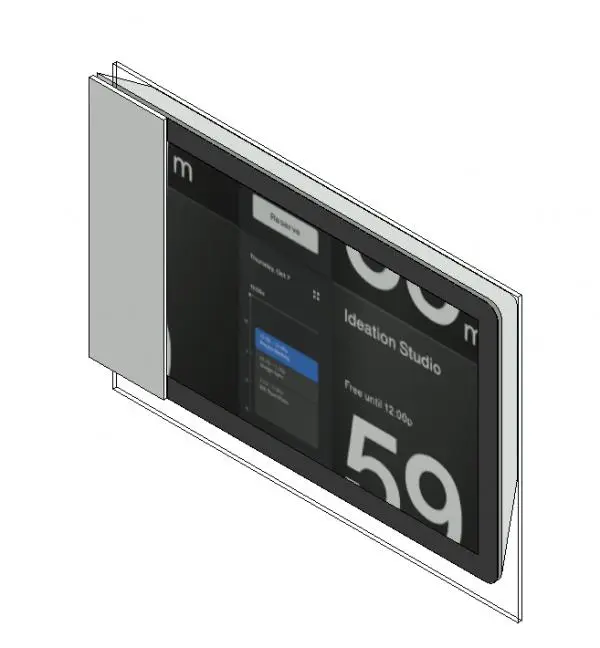
Designed for corporate interiors, this modern room scheduling display Revit family features an integrated digital touch interface on a clear mounting panel. The unit presents a compact, horizontal touchscreen display framed by a slim dark bezel, mounted against a flat transparent backplate suited for glass partition or drywall installation. An opaque vertical mounting bracket wraps the left profile, providing structural anchorage and conduit concealment. The front face illustrates a clean user interface detailing room availability, timeline blocks, and meeting subject titling. Contrasting dark glass finishes with satin silver hardware, the geometric enclosure maintains a flush, minimal profile that integrates smoothly alongside contemporary architectural glazing systems and conference room thresholds.
The download is a 502 KB file containing a Revit family (.rfa). Load it into a project from the Insert tab with Load Family, then place it like any other component of its category; it schedules and tags with the rest of your model.
In Autodesk Revit, this specialty equipment family inserts cleanly adjacent to meeting room entrance doors and conference partitions. Users can adjust the mounting elevation to comply with accessible reach standards or align directly with glazed mullions. Material parameters enable custom finishes for the perimeter bracket, while the face graphical elements support clear coordination across interior elevations, low-voltage electrical plans, and detailed BIM schedules.