Loading page…
Revit Family
Under-Desk Articulating Keyboard Tray with Mouse Platform
by Xiao Jin
About this asset
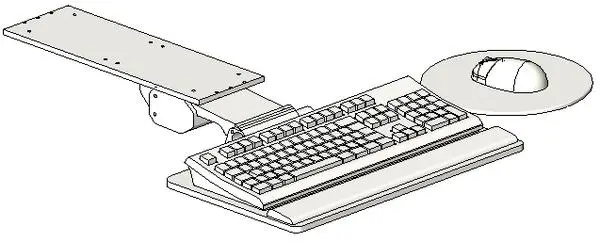
This modern articulating keyboard tray Revit family features a sliding under-desk mounting plate, wrist rest, and circular mouse platform. The assembly features a slim under-counter mounting bracket perforated with fixing holes for securing directly beneath a worksurface. A central pivoting arm mechanism connects to a secondary articulation joint, supporting a wide, rounded keyboard shelf equipped with a built-in wrist rest and a full-size computer keyboard. Projecting to the right side, an integrated circular platform accommodates an ergonomic mouse. Mechanical joint lines, keyboard key layouts, and mounting bolt patterns are modeled as distinct geometric elements suited for technical documentation.
The download is a 819 KB file containing a Revit family (.rfa). Load it into a project from the Insert tab with Load Family, then place it like any other component of its category; it schedules and tags with the rest of your model.
Load this component directly into Revit project or desk nested family templates. Position the mounting plate beneath desk tops, adjusting elevation offsets to ensure realistic clearance for user seating and knees. Materials are assigned to discrete elements, allowing practitioners to map custom shaded or photorealistic finishes for metal brackets and composite components in downstream renderings.
Engineered for commercial workplace interiors, corporate open-plan desks, reception counters, computer labs, and call center layouts. This ergonomic workstation accessory serves space planning, detailed interior fit-outs, and ergonomics coordination alongside office task chairs, monitor arms, and height-adjustable systems. Planners searching for under-counter computer trays, pull-out peripherals, and workstation accessories will find it ready for technical coordination.