Loading page…
Revit Family
Modern Grey Plastic Countertop POS Terminal
by Dionysia Daskalaki
About this asset
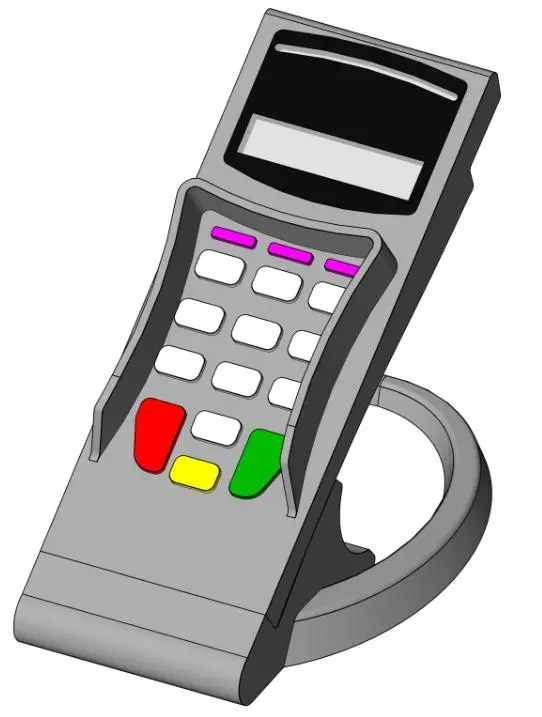
This modern countertop POS terminal Revit family features a moulded grey plastic body, privacy side shields, and an angled circular base stand. Designed for commercial retail counters, this payment terminal model features an angled profile resting on a curved ring mount. The front face includes an inset digital display screen above a recessed numeric keypad, complete with raised privacy side guards for secure PIN entry. Distinctive color-coded push buttons represent standard transaction functions, including green enter, red cancel, and yellow correction keys alongside functional soft keys. The main grey enclosure transitions cleanly into an ergonomic card swipe and chip reader silhouette appropriate for point-of-sale mockups.
The download is a 727 KB file containing a Revit family (.rfa). Load it into a project from the Insert tab with Load Family, then place it like any other component of its category; it schedules and tags with the rest of your model.
As a standard Revit specialty equipment component, this family can be placed directly onto service counters, cash wraps, or reception desks. Team members can align the base to millwork surfaces in plan or 3D views and schedule it under relevant equipment categories. The clean geometry provides clear clearance definition for ergonomic cashier workstation studies without overloading project file sizes.
Essential for retail fit-outs, hospitality bars, restaurants, hotel front desks, and bank teller stations, this payment device pairs naturally with cash registers, barcode scanners, and custom checkout counters. Architects and interior designers specifying front-of-house commercial interiors often search for credit card terminal families, countertop point of sale hardware, PIN pad readers, and cashier accessories during design development and construction documentation phases.