Loading page…
Revit Family
Manual Pull-Down Projector Screen with Brackets
by Piyush Mahulkar
About this asset
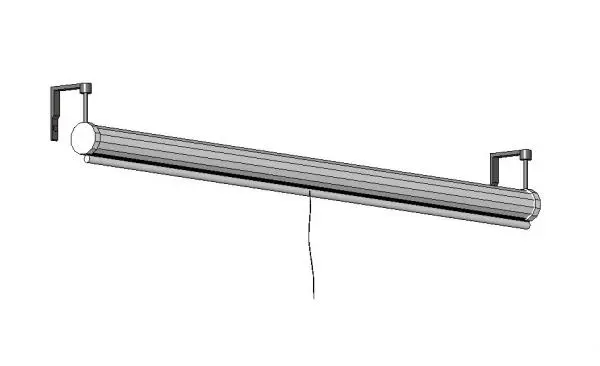
Designed for commercial presentations, this retractable pull-down projector screen Revit family features mounting brackets and a central release cord. The unit comprises an elongated cylindrical metal housing with faceted end caps, enclosing a rolled projection surface in its stowed configuration. Twin L-shaped mounting brackets extend outward to facilitate wall or soffit fixing, detailed with anchor flanges and vertical clearance stems. A weighted lower slat seals the casing aperture, complemented by a central pendant pull cord for manual deployment. Rendered in clean monochrome tones, the assembly presents a disciplined, utilitarian form suitable for technical BIM coordination and ceiling integration.
The download is a 410 KB file containing a Revit family (.rfa). Load it into a project from the Insert tab with Load Family, then place it like any other component of its category; it schedules and tags with the rest of your model.
Load the RFA component directly into your Revit project environment to position it along partition heads, structural bulkheads, or exposed ceiling trusses. The family facilitates clear MEP and AV equipment coordination, allowing designers to resolve clearance conflicts with suspended lighting layouts, ductwork, and ceiling grilles prior to final technical specification and drawing delivery.
Suited to workplace and institutional settings, this AV fixture coordinates effectively in corporate meeting rooms, boardroom layouts, conference centres, university lecture halls, and school classrooms. It pairs seamlessly with wall-mounted whiteboards, conference tables, ceiling projectors, and acoustic wall cladding. The component assists architects and interior designers documenting corporate fit-outs and educational refurbishment packages during detailed design and tender documentation phases.