Loading page…
Revit Family
Grey Steel Manual Wheelchair with Turning Clearance
by Charles Ray
About this asset
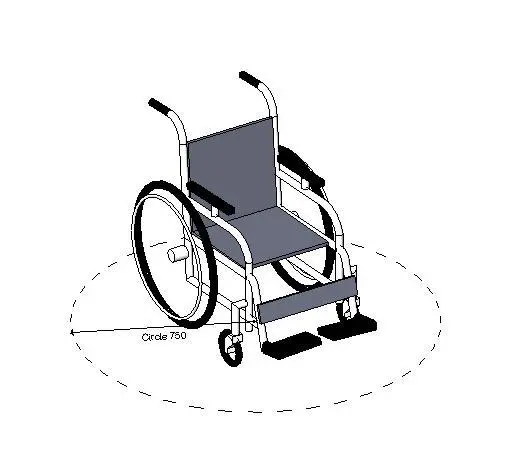
This manual wheelchair Revit family features tubular framing and an integrated circular turning clearance graphic for accessibility coordination. The family depicts a standard manual self-propelled wheelchair composed of a tubular metal chassis, upright backrest, and padded seat sling in neutral grey. Two large rear spoke wheels with outer push rims flank the frame, paired with dual front swivel casters and fold-down footplates. Angled rear push handles with ergonomic grips rise above the seat back, alongside integrated low-profile armrests. At floor level, a dashed concentric clearance circle indicating a 750 mm radius is embedded to visually verify wheelchair turning envelopes directly in spatial layouts.
The download is a 1.3 MB file containing a Revit family (.rfa). Load it into a project from the Insert tab with Load Family, then place it like any other component of its category; it schedules and tags with the rest of your model.
Load this.rfa component directly into your Revit project environment to verify compliance against universal accessibility and egress codes. The clearance boundary allows MEP engineers, interior architects, and space planners to validate turning circles in plan and 3D views without drawing manual detail lines. Visibility graphics can be adjusted per view to isolate the equipment geometry from reference clearance annotations.
Indispensable for healthcare planning, accessible restroom design, hospital wards, outpatient clinics, and public transport hubs. It suits schematic barrier-free audits as well as detailed fit-outs for DDA, ADA, and local building code compliance. The model pairs seamlessly with grab bars, accessible vanity counters, wide doorway corridors, and hospital bed bays, facilitating accurate spatial clash prevention during technical design phases.