Loading page…
Revit Family
Grey Railway Crossing Signal – Ding Dongs
by Simin Yang
About this asset
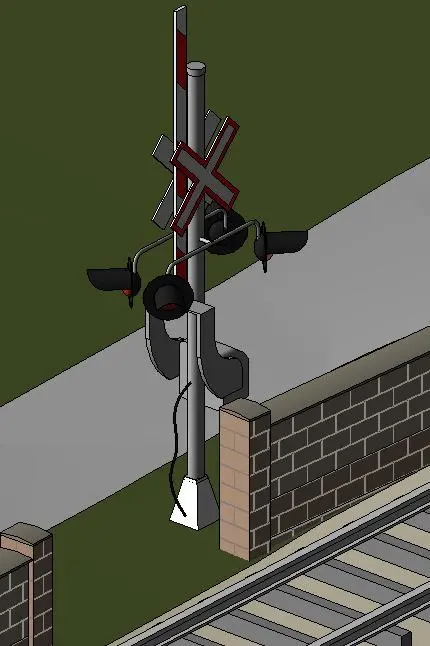
This railway crossing signal Revit family features a vertical steel post equipped with a crossbuck sign and integrated warning lights. This industrial-style railway crossing signal is a functional site element designed for transportation infrastructure projects. The assembly consists of a central cylindrical steel post mounted on a concrete-look base, featuring a classic X-shaped crossbuck sign at the upper section. Two sets of directional warning signal lights are mounted on horizontal brackets extending from the main post. The components are rendered in a utilitarian grey finish with black light housings and red signal indicators, providing a realistic representation of standard railroad crossing warning equipment for site planning and exterior visualisations.
The download is a 932 KB file containing a Revit family (.rfa). Load it into a project from the Insert tab with Load Family, then place it like any other component of its category; it schedules and tags with the rest of your model.
As a native Revit family, this crossing signal is designed for placement within site plans or exterior 3D views. Users can load this component into their project environment and host it on top-level topography or hardscape surfaces. The model maintains standard visibility settings, allowing it to be toggled off in floor plans if necessary. For high-quality rendering, users should apply appropriate material shaders to the metal post and light housings to ensure realistic reflection and light emission effects.