Loading page…
Revit Family
Disabled Parking Bay Pavement Marking
by Rodrigo Vidal
About this asset
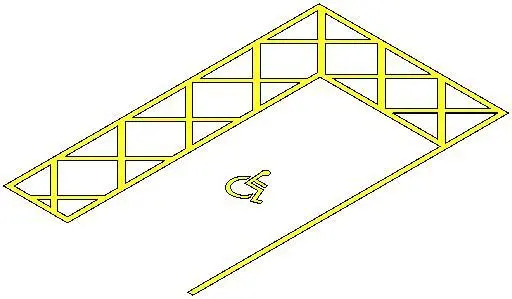
This Revit family provides a standard disabled parking bay pavement marking for site planning, featuring a clear accessibility icon. Designed for site documentation, this Revit family represents a standard accessible parking bay configuration. It includes the required surface graphic for a disabled parking space, complemented by a hatch-patterned safety zone or aisle demarcation. The geometry is clean and lightweight, intended for placement directly on site topography or floor surfaces within a project. The layout adheres to conventional parking standards, providing a visual indicator for designated accessible spots in parking lot designs. It is delivered as a flat, surface-hosted component to ensure it integrates seamlessly with host floors or site slabs without complex modelling overheads.
The download is a 266 KB file containing a Revit family (.rfa). Load it into a project from the Insert tab with Load Family, then place it like any other component of its category; it schedules and tags with the rest of your model.
Load this family into your site plan or floor plan view to annotate parking layouts. As a surface-hosted component, it snaps to the top face of your site slab or asphalt finish. Users should adjust the view visibility settings to ensure the marking displays correctly in both coarse and fine detail levels. Coordinate the placement with your project's parking schedule to maintain accurate site area counts and accessibility compliance documentation during the design development phase.