Loading page…
Revit Family
Traditional Wingback Armchair
by Marcie Chlewicki
About this asset
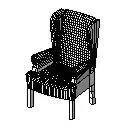
This traditional wingback armchair is a Revit family featuring a tall contoured backrest with classic side wings and integrated armrests. The model depicts a classic wing chair characterized by an upright, tall back framed by side wings designed to shelter the sitter. Straight armrests flank a deep seat base, supported beneath by vertical structural legs. Surface tessellation across the backrest and seat reflects detailed upholstery or woven texture mapping within the Revit environment. Compact yet formal, its silhouette captures traditional domestic seating geometry, balancing comfortable proportions with defined upright contours suitable for structured interior elevations and layout plans.
The download is a 133 KB file containing a Revit family (.rfa). Load it into a project from the Insert tab with Load Family, then place it like any other component of its category; it schedules and tags with the rest of your model.
As a native Revit furniture family, this component loads directly into project templates or active models via the Insert tab. Place it freely on floor levels or reference planes in plan and 3D views. Instance or type parameters allow designers to assign material finishes to upholstery, frame, and legs, ensuring accurate graphical overrides and automated integration into Revit furniture schedules.
Ideal for classic residential interiors, hospitality suites, hotel lobbies, and historic restoration schemes, this wingback lounge chair provides elegant accent seating. It pairs naturally with low timber coffee tables, traditional fireplaces, floor reading lamps, and formal living room arrangements. Interior designers and BIM coordinators can incorporate this Revit asset during design development through to technical fit-out documentation to communicate traditional spatial character.