Loading page…
Revit Family
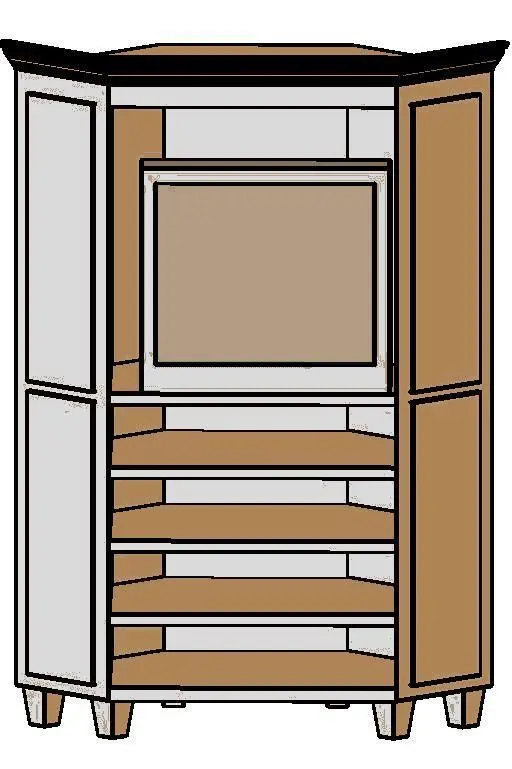
Traditional Brown Wood Corner TV Cabinet
by Frank Costantini
About this asset
Designed for angled spatial layouts, this traditional corner TV cabinet Revit family provides layered media shelving under an integrated screen bay. Engineered with a chamfered footprint, this corner-oriented cabinet is designed to nest flush into standard perpendicular room junctions. The unit features an outward-flaring top cornice moulding and rests upon sturdy, tapered square feet. Its primary elevation reveals a prominent upper compartment configured to hold a television or display screen, positioned directly above four open horizontal shelves tailored for media consoles, players, and cable accessories. Slanted side panels display understated recessed rectangular framing, rendered in a warm medium-brown wood finish with contrasting dark trim outlining the upper crown and edges.
The download is a 287 KB file containing a Revit family (.rfa). Load it into a project from the Insert tab with Load Family, then place it like any other component of its category; it schedules and tags with the rest of your model.
Load this component directly into any Autodesk Revit project file to populate residential floor plans and interior elevations. Place the freestanding family along intersecting interior partition walls and rotate it into position using standard alignment tools. Assign project-specific finish materials via the family type parameters to harmonise timber tones with neighbouring millwork, while verifying clear sightlines and circulation clearances across associated layout sheets and schedules.