Loading page…
Revit Family
Industrial Charcoal Steel T-Head Bollard – 10 Tons
by HsingChen Wu
About this asset
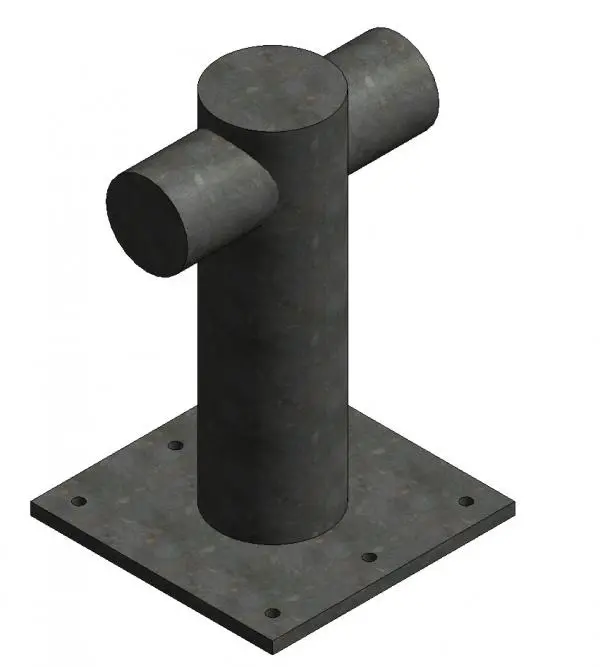
Industrial steel mooring bollard Revit family featuring a cylindrical vertical post with cross-arm horns and a pre-drilled square base plate. Defined by heavy-duty utilitarian geometry, this marine mooring bollard comprises a central vertical cylindrical post intersected near the top by horizontal cylindrical horns. The assembly is anchored to a thick square steel mounting plate pre-drilled with six perimeter bolt holes for structural fastening into concrete quays or decks. The surface is mapped with a mottled charcoal-grey industrial cast finish, simulating weathered steel or painted iron. Its proportions reflect commercial harbour hardware engineered to hold mooring lines under lateral tension, presenting clean solid geometry suitable for technical coordination.
The download is a 461 KB file containing a Revit family (.rfa). Load it into a project from the Insert tab with Load Family, then place it like any other component of its category; it schedules and tags with the rest of your model.
In Revit, load the RFA component directly into your project environment and position it onto structural slabs, quayside paving, or dock foundations. Assign standard subcategories or manage graphical overrides via Object Styles. You can duplicate family types to adjust sizing parameters or reassign procedural finish textures to match maritime site specifications.
Suited to civil engineering, industrial logistics, and maritime harbour master plans, this bollard models quaysides, shipping terminals, marinas, and dry docks. It works effectively alongside sheet piling, wharf fenders, industrial crane rails, and access gangways. Designers and modelers frequently search for mooring bollards, dock bitts, quayside hardware, and marine deck accessories during technical BIM detailing, site coordination, and port facility visualizations.