Loading page…
Revit Family
Wireless Access Security Keypad
by Io Tat Leung
About this asset
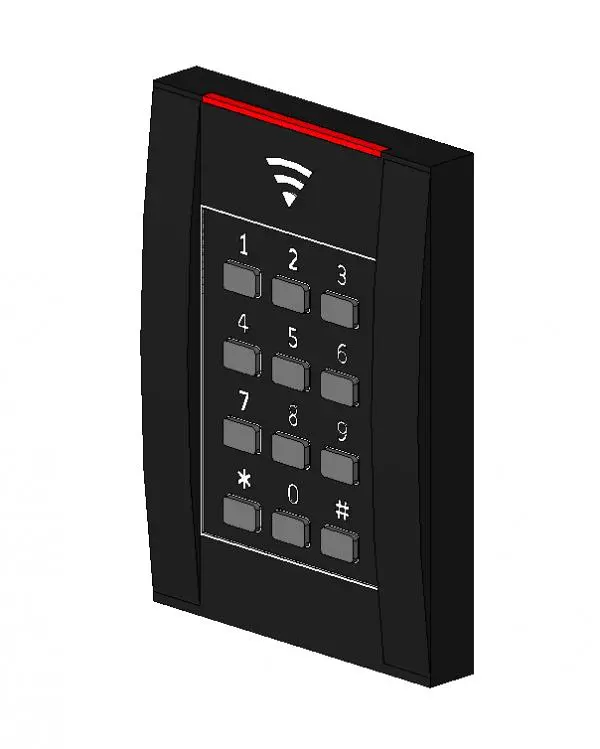
This modern wireless access security keypad is a wall-hosted Revit family featuring a sleek black finish and numeric interface. The security keypad is a compact, wall-mounted unit designed for modern access control systems. It features a rectangular housing with a matte black finish, housing a numeric input grid with standard 0-9 digits, asterisk, and hash symbols. A prominent wireless connectivity icon is positioned above the keypad, while a thin red indicator light strip at the top provides visual status feedback. The design is minimalist and low-profile, intended for flush or surface mounting adjacent to entryways. Its clean lines and simple geometry ensure it integrates seamlessly into contemporary commercial or residential building entrances.
The download is a 942 KB file containing a Revit family (.rfa). Load it into a project from the Insert tab with Load Family, then place it like any other component of its category; it schedules and tags with the rest of your model.
In Revit, this component is classified as a wall-hosted family. Users should place the device on vertical surfaces such as walls or door frames. The family can be scheduled within the project's electrical or security device schedules. Ensure that the host wall has sufficient thickness to accommodate the mounting depth. For visualisations, apply a high-gloss material to the keypad buttons and a semi-matte finish to the main body to enhance realism in rendered views.
This security device is suitable for access control integration in office lobbies, apartment building entrances, and secure staff areas. It pairs well with electronic strike plates, magnetic door locks, and intercom systems. Professionals should search for this item when detailing security layouts, access control schematics, or building entry workflows. It is ideal for projects requiring a clean, unobtrusive interface for secure building access, particularly in high-traffic commercial environments or modern smart-home residential developments.