Loading page…
Revit Family
Double Flush Swing Door
by Rebecca Belton
About this asset
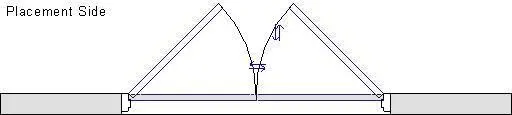
Double flush interior door Revit family displaying paired equal leaves, jamb profiles, and swing arcs in plan view for documentation. This wall-hosted door assembly comprises a pair of equal-width flush leaves hung within a profiled jamb frame. The family layout exhibits standard clearance swing paths on the placement side, complete with symbolic representation for both closed and open states. Frame returns coordinate directly with host wall thicknesses, providing clean cutouts and consistent graphic linework. The geometry is tuned for crisp technical drawings, showing clear clearances, hinge points, and central meeting stiles without superfluous decorative elements, making it suitable for clean architectural layout schemes.
The download is a 72 KB file containing a Revit family (.rfa). Load it into a project from the Insert tab with Load Family, then place it like any other component of its category; it schedules and tags with the rest of your model.
Load this component directly into a host project to insert it into standard architectural walls. Because it cuts host geometry automatically, users can adjust orientation using spacebar or standard flip controls to define entry orientation. View graphics adapt across floor plan, section, and elevation presentations, ensuring clean documentation in drawing sets.
Suited for commercial fit-outs, educational facilities, healthcare corridors, and workplace interiors, this double leaf setup fits circulation routes requiring unobstructed egress widths. Architects and BIM coordinators can incorporate this asset when scheduling interior openings, egress corridors, back-of-house storage entries, and renovation survey models where accurate door swings and wall opening dimensions are critical.