Loading page…
Revit Family
Double Flush Opposite-Swing Door
by Jonathan Hamilton
About this asset
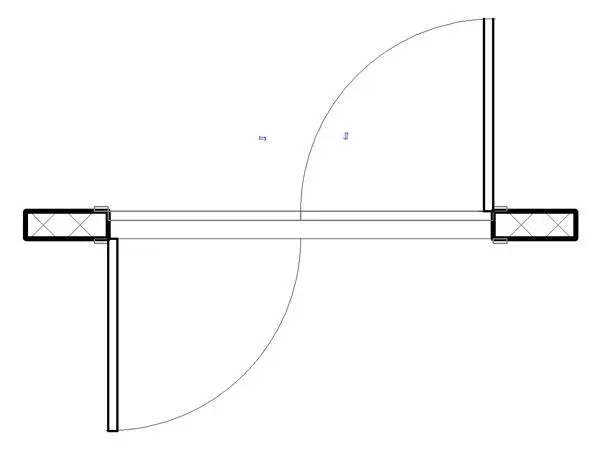
This opposite-swing double flush door Revit family provides dedicated two-way egress clearance geometry for high-traffic partition layouts. The assembly features a double-leaf configuration arranged with opposing door leaf swings, standard for cross-corridor egress and bidirectional pedestrian circulation. Each leaf is detailed as a flat, flush panel set into a profiled perimeter frame with wrapped jamb returns for framed stud walls. Standard quarter-circle plan arcs delineate the travel envelope for both leaves independently, showing clearance boundaries into adjacent circulation zones. Symmetrical flip control arrows allow instantaneous orientation adjustments along the wall centerline without disrupting alignment.
The download is a 143 KB file containing a Revit family (.rfa). Load it into a project from the Insert tab with Load Family, then place it like any other component of its category; it schedules and tags with the rest of your model.
Load the component directly into project templates as a standard wall-hosted door element. Place the unit along interior corridor walls, allowing the opening cut to clean automatically through composite wall layers. Adjust swing handedness and orientation using native instance flip toggles to accommodate statutory escape routes and sightline requirements across plan views.
Engineered primarily for public and institutional typologies, this opposite-swing configuration is standard in hospital corridors, secondary school circulation spines, commercial office lobbies, and transportation terminals. It coordinates cleanly with fire-rated wall assemblies, access control schedules, and code-driven corridor egress calculations where separate exit streams must be maintained without mutual leaf interference.