Loading page…
Revit Family
Steel Shear Plate Detail Component
by Jennifer Zagaja
About this asset
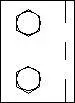
This Steel Shear Plate Detail Component is a 2D Revit family representing a standard two-bolt structural steel connection. The component illustrates a standard shear plate connection typically used for beam-to-column or beam-to-beam junctions in structural steel frameworks. It features a rectangular plate profile with two circular bolt holes arranged vertically. The representation uses clean, standard linework suitable for technical documentation and construction detailing. As a 2D detail component, it is designed to be placed directly into drafting views or onto section drawings to clarify structural assemblies. The geometry is straightforward, focusing on the essential bolt pattern and plate edge profile required for typical steel framing construction documents.
The download is a 317 KB file containing a Revit family (.rfa). Load it into a project from the Insert tab with Load Family, then place it like any other component of its category; it schedules and tags with the rest of your model.
Load this component into your Revit project and access it through the Detail Component tool in the Annotate tab. It is intended for use in drafting views where a simplified, schematic representation of a structural connection is required. Users can align the component with beam or column lines and use the standard move and rotate commands to position it accurately within the assembly. It integrates seamlessly with existing structural drafting workflows, providing a consistent look across all project documentation.