Loading page…
Revit Family
Metal Panel on Subgirt Detail Component
by Mauricio Torres Cande
About this asset
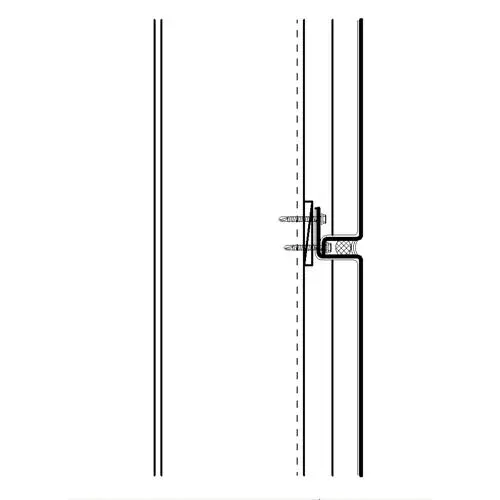
This Revit detail component provides a precise section view of a metal panel cladding system mounted on a structural subgirt. This 2D detail component represents a standard rainscreen wall assembly in section. It clearly illustrates the interface between the exterior metal cladding panel and the underlying subgirt structure. The linework distinguishes the panel profile, the girt connection, and the fastener locations, including a cross-hatched detail indicating a thermal break or sealant joint between panel segments. Proportions are typical for heavy-gauge architectural metal systems, showing the offset required for ventilation or insulation clearance. The component is designed for clean representation in technical drafting, ensuring clarity at standard scales like 1:5 or 1:10.
The download is a 205 KB file containing a Revit family (.rfa). Load it into a project from the Insert tab with Load Family, then place it like any other component of its category; it schedules and tags with the rest of your model.
To integrate this file, load the RFA into your Revit project and place it directly into a drafting view or onto a section callout. Because it is a line-based detail component, it is intended for use in 2D annotations rather than 3D modeling. Once placed, you can align the linework with your existing wall assembly layers. It is best practice to manage these via a specific subcategory in your Object Styles to control line weights independently from model geometry.
Architects and facade engineers will find this component essential for documenting rainscreen wall assemblies in commercial, industrial, or high-end residential projects. It is particularly useful during the construction documentation phase when detailing building envelopes and exterior cladding interfaces. Search for this asset when drafting wall sections, curtain wall connections, or facade technical specifications. It pairs effectively with standard wall system families, allowing for rapid, accurate annotation of complex metal panel installations without the need to draw repetitive connection details from scratch.