Loading page…
Revit Family
Handrail Profile Detail Component
by Taija Thomas
About this asset
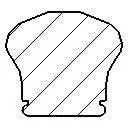
This Revit detail component provides a precise cross-section profile for a handrail, enabling accurate documentation in drawings. The profile features a rounded top surface that transitions into vertical sides with subtle indentations near the base, suggesting a mechanical mounting point or grip feature. Its silhouette is symmetrical, designed to represent a standard architectural handrail element in section view. The geometry is clean and simple, focusing on the essential cross-sectional shape required for architectural detailing. This component serves as a baseline for creating custom railing families or for annotating stair and balustrade assemblies within a project's construction documentation set, ensuring consistency across various detail views.
The download is a 51 KB file containing a Revit family (.rfa). Load it into a project from the Insert tab with Load Family, then place it like any other component of its category; it schedules and tags with the rest of your model.
To integrate this component, load the file into your Revit project and use the detail component tool to place it within drafting views or directly into section views. It functions as a 2D annotation element that can be scaled or mirrored to suit specific stair configurations. Users can easily align the profile with existing balustrade geometry or use it to populate custom railing families, ensuring that all cross-sectional representations meet the required project standards for clear and legible construction documentation.