Loading page…
Revit Family
Batter Arrow Detail Component
by Mohitha Desu
About this asset
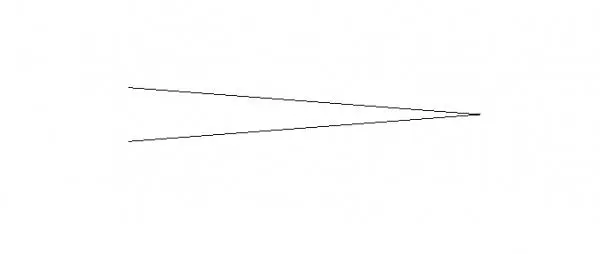
This Revit detail component provides a standard batter arrow symbol for documenting wall slopes and earthwork in 2D documentation. The batter arrow is a precise 2D drafting element designed for use within Revit detail views or drafting views. It features a clean, sharp-angled geometric form, consisting of two converging lines that meet at a point to clearly indicate the direction and extent of a slope or wall batter. As a standard annotation family, it remains scale-independent and maintains line weight consistency across various view scales, ensuring clear communication on construction documents. The vector-based geometry is lightweight and efficient, providing a professional graphical representation for site plans, structural sections, and foundation details.
The download is a 307 KB file containing a Revit family (.rfa). Load it into a project from the Insert tab with Load Family, then place it like any other component of its category; it schedules and tags with the rest of your model.
To use this component, load the RFA file into your project or template and access it via the Detail Component tool on the Annotate tab. Once placed, the symbol can be rotated to align with the specific slope or batter angle required on your drawing sheet. Because it is a native Revit family, it can be easily mirrored or copied to maintain consistent documentation standards across multiple plan and section views in your construction set.
This symbol is essential for civil engineers, landscape architects, and structural designers working on site plans, retaining wall sections, or foundation details. It is frequently employed during the construction documentation stage to clearly define the geometry of sloped earthwork or battered masonry walls. Professionals will find this useful when drafting site grading plans or structural foundation details where slope orientation is critical for contractor clarity. It pairs perfectly with standard dimensioning and spot elevation tags to provide a comprehensive set of site instructions.