Loading page…
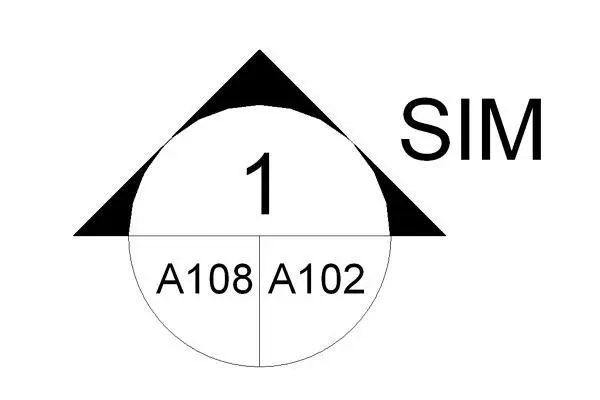
Revit Family
Section Head Filled with Sheet Reference
by VICTORIA CARVAJAL
About this asset
This Revit annotation family provides a standard filled section head symbol with integrated sheet and detail references for plans. The section head features a clean, professional design consisting of a circular body with a filled triangular pointer indicating the section direction. It includes clear, legible labelling fields for the detail number, as well as split-cell references for the sheet number and the parent sheet. The geometry is fixed to standard drafting conventions, ensuring consistency across construction documentation sets. The layout is optimized for readability at various scales, preventing visual clutter in dense plan views while maintaining clear communication of cross-referenced drawings for contractors and site teams during the construction administration phase.
The download is a 72 KB file containing a Revit family (.rfa). Load it into a project from the Insert tab with Load Family, then place it like any other component of its category; it schedules and tags with the rest of your model.
To implement this symbol, load the family into your Revit project and assign it to the desired section tag type within the project browser. Once loaded, the section head parameters automatically pull data from the parent view and the referenced sheet. Ensure that the text labels are mapped correctly within the type properties to match your firm's documentation standards. Users should verify that the scale of the annotation remains consistent across varying plan view scales to maintain professional output quality.