Loading page…
Revit Family
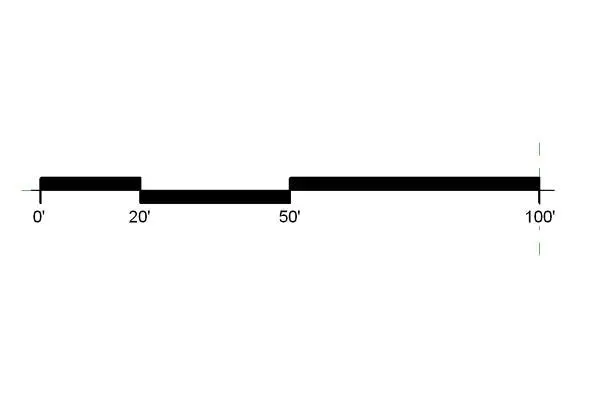
Graphic Scale Annotation 1-20 Imperial Filled
by Jim Fenzel
About this asset
Graphic scale annotation family for Revit, featuring a filled linear design calibrated for 1:20 scale drawings using imperial units. This graphic scale annotation is a standard Revit family designed for clear, professional documentation. It features a high-contrast, filled-bar aesthetic that ensures readability on printed sheets and digital PDFs. The layout includes demarcations at 0, 20, 50, and 100-foot intervals, providing a quick visual reference for site plans, floor plans, and elevation drawings. The geometry is clean and vector-based, ensuring it remains crisp at any zoom level or output scale. This component is essential for maintaining consistent drafting standards across a project set, helping architects communicate spatial relationships effectively.
The download is a 72 KB file containing a Revit family (.rfa). Load it into a project from the Insert tab with Load Family, then place it like any other component of its category; it schedules and tags with the rest of your model.
To use this annotation in Revit, load the family into your project and place it directly onto your sheets or within a view template. As a generic annotation family, it remains consistent regardless of the view scale, though it is specifically intended for 1:20 documentation. Users can easily toggle between instances or duplicate the family to create variations for different scales. Ensure all annotation layers are correctly set in the view visibility graphics to maintain proper hierarchy and print clarity.
This graphic scale is suitable for all stages of architectural and engineering documentation, from preliminary site analysis to final construction sets. It is particularly useful for large-scale site plans, landscape layouts, and detailed elevation drawings where a rapid visual scale reference is required. Professionals working in residential, commercial, and institutional sectors will find it a standard addition to their office library. It pairs well with standard title blocks and north arrows, ensuring a cohesive and professional appearance across all project deliverables.