Loading page…
Revit Family
Elevation Marker Tag – Circular Detail Head
by DaeHyun Kim
About this asset
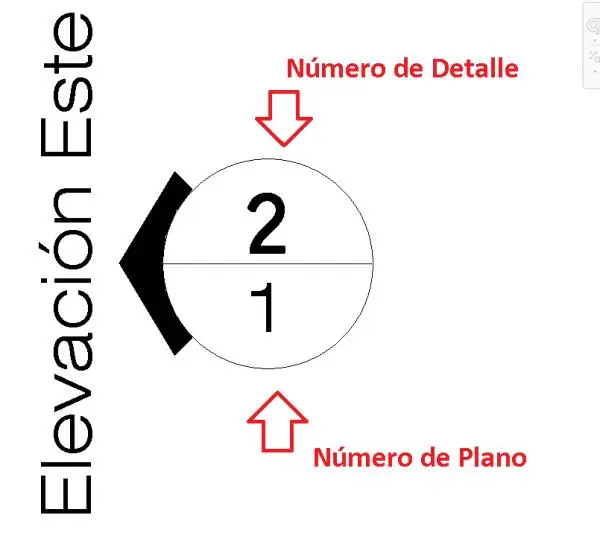
This Elevation Marker Tag is a Revit family annotation symbol featuring a circular head for referencing drawing details and sheets. This elevation marker is a standard Revit annotation family designed for clear, professional construction documentation. It consists of a circular head divided horizontally into two fields: the top half is designated for the detail number, while the bottom half is reserved for the sheet number reference. A solid black triangular pointer indicates the direction of the elevation view. The symbology is clean and minimalist, adhering to standard architectural drafting conventions. It is a lightweight, vector-based component that ensures consistent graphic representation across all project sheets and technical drawing sets.
The download is a 215 KB file containing a Revit family (.rfa). Load it into a project from the Insert tab with Load Family, then place it like any other component of its category; it schedules and tags with the rest of your model.
To implement this marker, load the RFA file into your Revit project and assign it within the Elevation Tag type properties. Once placed, the symbol dynamically updates to reflect the view name and sheet location based on your project browser organisation. It is fully compatible with standard view references, allowing for automated linking between elevation views and their respective drawing sheets, maintaining accuracy throughout the documentation phase of the project.
This symbol is essential for architects and technicians producing construction documentation for residential, commercial, or hospitality projects. It is typically used in the early to late design stages to cross-reference elevation views on floor plans, ensuring contractors and consultants can easily navigate the drawing set. Professionals will find this useful for maintaining consistent graphic standards across large-scale projects, pairing it with standard section markers and callout tags to create a cohesive and readable set of architectural drawings.