Loading page…
Revit Family
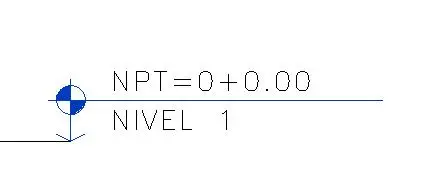
Elevation Level Head Symbol Nivel 1
by Yiyang Sang
About this asset
This Revit elevation level head symbol is a native family for architectural documentation, featuring a standard circular marker. The elevation level head symbol is a clean, minimalist annotation component designed for architectural documentation in Revit. It features a circular marker divided into quadrants, with alternating filled segments providing clear visual hierarchy on technical drawings. The family includes text labels for the 'NPT' (Nivel de Piso Terminado) elevation value and a 'NIVEL' identifier, allowing for immediate readability of floor heights. The geometry is vector-based, ensuring crisp line weights when printed across various scales. This component is designed to maintain consistent graphical standards across project sheets, providing a professional, legible way to communicate vertical datum information.
The download is a 266 KB file containing a Revit family (.rfa). Load it into a project from the Insert tab with Load Family, then place it like any other component of its category; it schedules and tags with the rest of your model.
To implement this symbol, load the family into your Revit project and access it via the 'Elevation Tag' settings within your view templates. Users should map the label parameters to the project's shared parameters to ensure the elevation values update automatically based on the model's actual floor levels. The symbol is designed to be placed directly onto elevation or section views, where it will dynamically align with the model geometry, facilitating efficient and accurate documentation workflows for construction sets.