Loading page…
Revit Family
Elevation Annotation Symbol T/Beam
by Anthony George Morey
About this asset
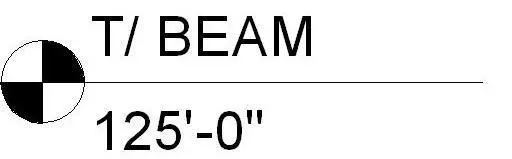
This Revit annotation family provides a standard T/Beam elevation marker symbol for precise documentation in construction sets. The symbol features a circular quartered target icon alongside a horizontal leader line, designed for identifying structural beam levels. It includes a text label for T/Beam designation and a corresponding value field for the elevation height. The graphic is clean and vector-based, conforming to standard architectural drafting conventions for clear communication of structural datum points. It is built as a native Revit annotation family, allowing for consistent placement across multiple project views. The geometry is fixed to ensure legibility at standard drawing scales, maintaining clarity when printed on construction documentation sheets.
The download is a 113 KB file containing a Revit family (.rfa). Load it into a project from the Insert tab with Load Family, then place it like any other component of its category; it schedules and tags with the rest of your model.
Load this family into your project and assign it to the appropriate annotation category via the family editor. Once loaded, it can be placed directly onto sections or elevation views to mark structural levels. Users should ensure the label parameters are correctly mapped to project parameters to allow for automated tagging. Because it is a system-agnostic annotation, it scales automatically with the view scale, ensuring that the text size and symbol diameter remain consistent across different drawing sheets.