Loading page…
Revit Family
Dummy Callout Annotation Symbol
by Saba Samiei
About this asset
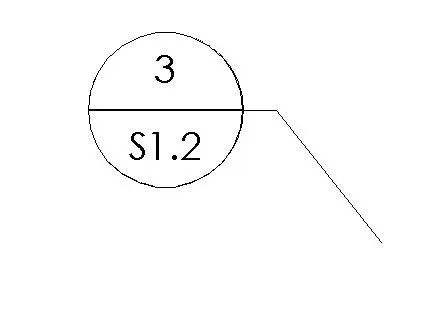
This dummy callout annotation symbol is a Revit family designed for custom drafting documentation and non-automated sheet references. The symbol consists of a standard circular frame divided horizontally into two distinct fields. The upper section is reserved for the detail number, while the lower section is intended for the sheet reference code. It features a clean, thin-line graphic style consistent with professional architectural documentation standards. The integrated leader line allows for precise placement on plan, section, or elevation views, providing a flexible tool for manual notation where automated Revit callouts are not suitable or required. The geometry is strictly 2D, ensuring lightweight performance within complex project files and consistent line weights across all scales.
The download is a 276 KB file containing a Revit family (.rfa). Load it into a project from the Insert tab with Load Family, then place it like any other component of its category; it schedules and tags with the rest of your model.
To use this family, load the RFA file into your Revit project environment. Once loaded, access the symbol through the annotate tab or the component menu. Place the symbol directly onto your drafting views or sheet layouts. Since this is a dummy annotation, the text fields are manual entries rather than parameters linked to view names or sheet numbers, allowing for full customisation of the reference data without affecting the project browser structure.
This asset is essential for architectural practices that require custom detailing symbols for specific project phases, such as schematic design or early-stage documentation where sheet numbering may be fluid. It is ideal for marking up sections, details, and site plans where automated tags might conflict with office graphic standards. Professionals often use these for placeholder references in collaborative environments, ensuring that drawing sets maintain a consistent visual language regardless of the underlying model data or the specific project delivery requirements.