Loading page…
Revit Family
Black Elevation Marker Annotation Symbol
by Itzel Salazar
About this asset
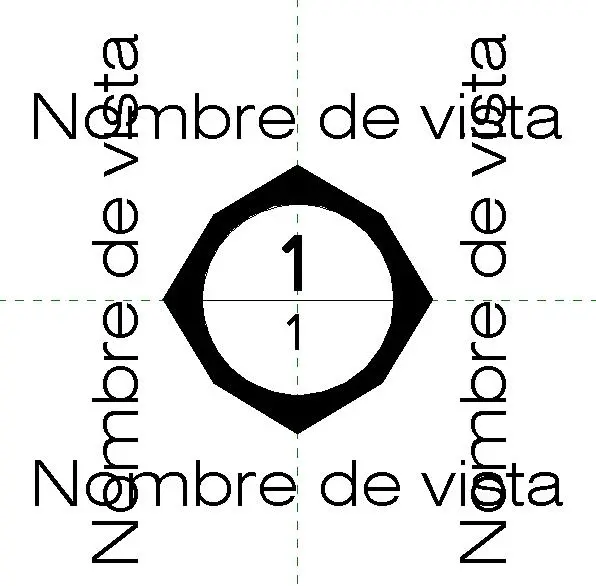
This Revit elevation marker annotation symbol provides a clean, professional graphical interface for documenting building facades. This Revit elevation marker annotation family features a clean, geometric design composed of a central octagonal frame housing two distinct labels for view number and sheet reference. The layout is structured to accommodate clear, readable text for project documentation, following standard architectural drafting conventions. The symbol includes placeholder text fields for view names, ensuring consistency across construction document sets. Its minimalist aesthetic avoids unnecessary ornamentation, prioritising legibility and technical clarity. The family is built with standard Revit annotation parameters, allowing for precise placement and orientation within plan views during the production of architectural drawing sets.
The download is a 184 KB file containing a Revit family (.rfa). Load it into a project from the Insert tab with Load Family, then place it like any other component of its category; it schedules and tags with the rest of your model.
To integrate this elevation marker into your project, load the RFA file into your Revit template or active project file. Once loaded, navigate to the project browser to assign the symbol to your elevation tags via the type properties menu. Ensure that the text parameters are correctly mapped to your project's shared parameters to automate the sheet referencing process. This family is designed to scale dynamically with your project view scale settings, maintaining consistent line weights and text sizes.