Loading page…
CAD Drawing
Road Graders Collection – Caterpillar and Terex
by Daniel Vianna
About this asset
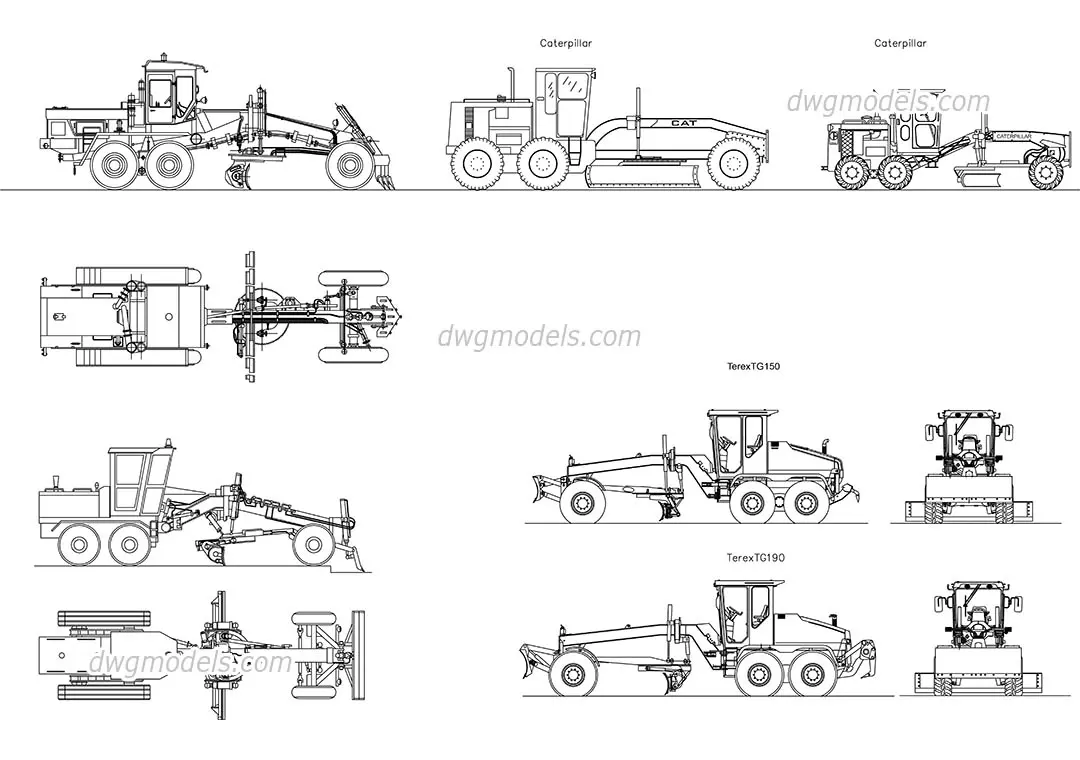
This collection of road grader CAD drawings in AutoCAD format provides detailed plan, side, and front elevations for site planning. This set features five distinct road grader configurations, including specific representations for Caterpillar and Terex TG150 and TG190 models. Each drawing is rendered in clean, precise black-line vector geometry, suitable for professional technical documentation. The set includes comprehensive views: top-down plan layouts, side profiles showing the articulation of the blade and chassis, and front-facing elevations illustrating the cabin and wheel stance. These assets are drafted with consistent line weights, ensuring clarity when integrated into larger site plans or civil engineering layouts where heavy machinery footprint and clearance are required.
The download is a 696 KB file containing an AutoCAD drawing (.dwg) drawn in all views holding 5 separate objects. It opens in AutoCAD, BricsCAD, DraftSight and other DWG-compatible CAD programs, ready to insert as blocks into plans and elevations.
These CAD drawings are supplied as native AutoCAD files, allowing for immediate insertion into existing site plans or master-planning documentation. Users can easily scale these blocks to match project-specific units or reference them as external DWG files to maintain file size efficiency. The geometry is clean and logically organised, making it straightforward to snap to site grids or incorporate into construction sequencing diagrams. Adjust line types or layer properties within your template to ensure these elements maintain appropriate hierarchy in your final output.