Loading page…
CAD Drawing
Stairs Dynamic Blocks
by KIM BROWN-IRVIS
About this asset
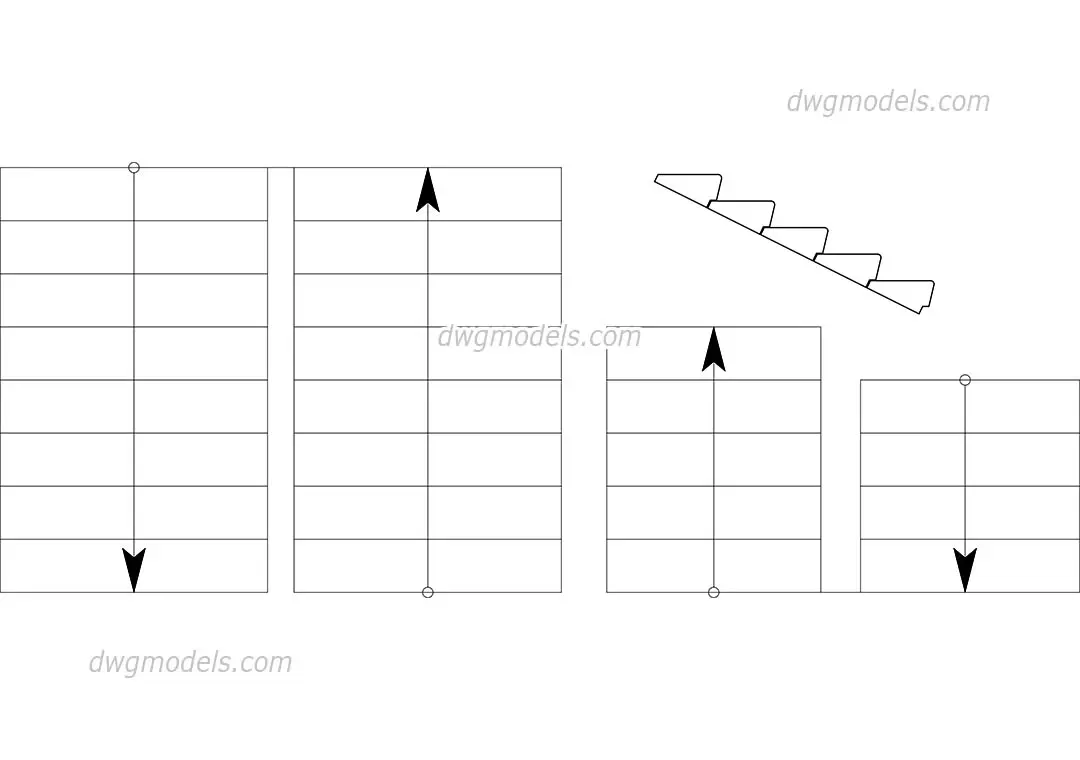
This collection of stair dynamic blocks for AutoCAD provides essential 2D plan and section views for architectural documentation. These AutoCAD blocks feature a clean, schematic representation of straight-flight stairs. The set includes multiple plan configurations displaying varying tread counts and directional flow arrows, alongside a singular side-profile section view showing the riser and tread geometry. The linework is standard, intended for clear legibility within technical floor plans and building sections. Each block is designed for straightforward insertion into project files, maintaining a consistent graphic language suitable for early-stage design development or final construction documentation where simple, non-complex stair representation is required for layout purposes.
The download is a 102 KB file containing an AutoCAD drawing (.dwg) drawn in all views. It opens in AutoCAD, BricsCAD, DraftSight and other DWG-compatible CAD programs, ready to insert as blocks into plans and elevations.
Integrate these blocks directly into your AutoCAD project files by using the design center or copy-pasting from the source file. Since these are dynamic, you can select the block and adjust parameters to suit your specific stairwell dimensions or floor-to-floor heights. Ensure your layer settings match your office standards before placement to maintain consistent line weights across your drawing set. These blocks are intended for use as 2D drafting components rather than 3D BIM models.
Ideal for residential or commercial floor plans, these stair blocks are a staple for architects and interior designers during the schematic and design development stages. They pair well with standard wall and door blocks to quickly populate circulation areas in technical drawings. Use them when you need to clearly denote vertical circulation on a floor plan or show basic stair geometry in a section. They are frequently searched for as CAD stair details, 2D stair blocks, or architectural stair symbols for AutoCAD.