Loading page…
Revit Family
Switch-Double
by HSIANGCHUN CHANG
About this asset
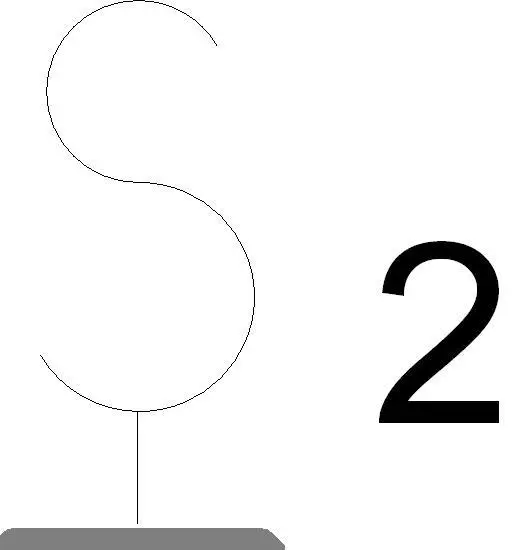
This double light switch Revit annotation symbol is a functional drafting element designed for accurate electrical plan documentation. The asset is a standard 2D electrical symbol representing a double-pole or dual-gang light switch configuration. It features the classic 'S2' notation, consisting of a stylised 'S' paired with the numeral '2', rendered in a clean, high-contrast black line weight suitable for architectural floor plans and reflected ceiling plans. The geometry is simplified for clear legibility at standard scales, such as 1:50 or 1:100, ensuring the electrical layout remains uncluttered while maintaining professional drafting standards. It is provided as a native Revit family component intended for placement within project files.
The download is a 174 KB file containing a Revit family (.rfa). Load it into a project from the Insert tab with Load Family, then place it like any other component of its category; it schedules and tags with the rest of your model.
To use this family, load the RFA file into your project or template and access it via the Electrical Fixtures or Annotation Symbols category. Place the symbol directly onto your floor plan views where switch locations are required. Because this is a 2D annotation element, it does not require complex rendering materials or 3D geometry. Users should ensure the symbol is mapped to the correct sub-category within their project's visibility graphics to maintain consistent line weights across all sheets.
This symbol is essential for architects and electrical engineers developing construction documentation for residential, commercial, and office projects. It is typically applied during the schematic design and design development phases to clearly communicate lighting control locations to contractors and clients. Designers often pair this with other standard electrical symbols, such as single-pole switches, dimmers, and power outlets, to create comprehensive electrical plans. Search for this asset when needing to populate lighting layouts or generate precise MEP coordination drawings for building permit submissions.