Loading page…
Revit Family
CMU to Brick Tie Detail Component
by Kacim Benhachmi
About this asset
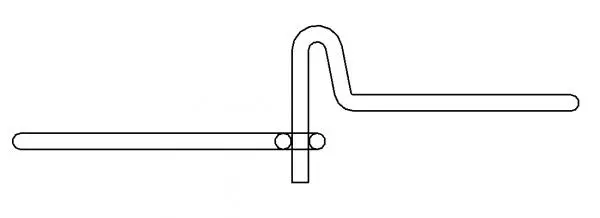
This Revit detail component provides a standard 2D section profile for a CMU to brick cavity wall tie in masonry construction. The component illustrates a two-piece adjustable masonry tie system designed for connecting a concrete masonry unit (CMU) backing wall to a brick veneer. It consists of a vertical pintle or eyelet section for anchoring into the CMU mortar joint and a horizontal tie that engages with the brickwork. The geometry represents a standard wire-form tie, providing the necessary profile for integration into wall section drawings. This 2D detail is drafted to match typical cavity wall build-ups, ensuring accurate representation of the mechanical connection between the structural blockwork and the outer masonry skin.
The download is a 266 KB file containing a Revit family (.rfa). Load it into a project from the Insert tab with Load Family, then place it like any other component of its category; it schedules and tags with the rest of your model.
Load this file into your Revit project as a standard detail component. It is designed to be placed directly into drafting views or onto section sheets where masonry wall assemblies are documented. Use the align tool to snap the tie into the mortar joints of your wall sections. As a 2D family, it does not impact the 3D model geometry, making it an efficient way to annotate construction documents without increasing file size or processing overhead.
Engineers and architects utilise this detail component during the documentation phase of masonry construction projects. It is essential for producing clear, code-compliant wall sections in residential, commercial, or industrial buildings featuring cavity wall systems. Professionals can use this to illustrate anchorage requirements for brick veneer installations, ensuring that the connection between the CMU and the face brick is clearly defined for contractors. It pairs perfectly with standard wall assembly details, helping to clarify masonry wall ties and cavity insulation placement.