Loading page…
Revit Family
Keyboard Shortcuts List
by Justin Cho
About this asset
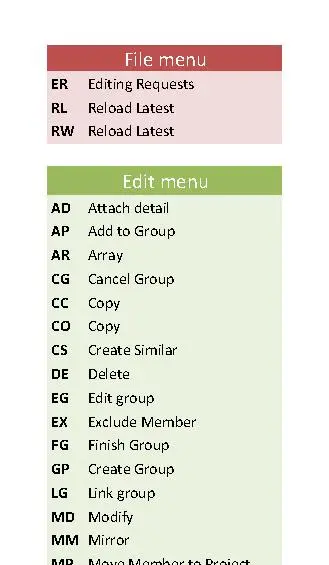
This Revit annotation family provides a structured list of keyboard shortcuts for efficient drafting and project modelling workflows. This Revit annotation family serves as a comprehensive reference guide for common software commands, presented in a clean, tabulated layout. The design features a modular structure with distinct colour-coded headers for different software menus, including File and Edit categories. Each entry aligns the specific two-letter shortcut code clearly against its corresponding command description. The layout is optimised for legibility, ensuring that team members can quickly identify and reference essential commands during high-pressure design phases. It is built as a standard 2D drafting element, allowing for consistent placement across all project documentation.
The download is a 184 KB file containing a Revit family (.rfa). Load it into a project from the Insert tab with Load Family, then place it like any other component of its category; it schedules and tags with the rest of your model.
Architects and BIM managers can load this family directly into a Revit drafting view or a custom legend sheet. As a standard annotation object, it functions like any other system family, allowing for placement on title blocks or dedicated reference sheets. Users can easily scale the text and adjust the graphical layout to match existing office standards, ensuring that the documentation remains compliant with internal BIM management protocols and project-specific guidelines for software efficiency.